


Description
Introduction
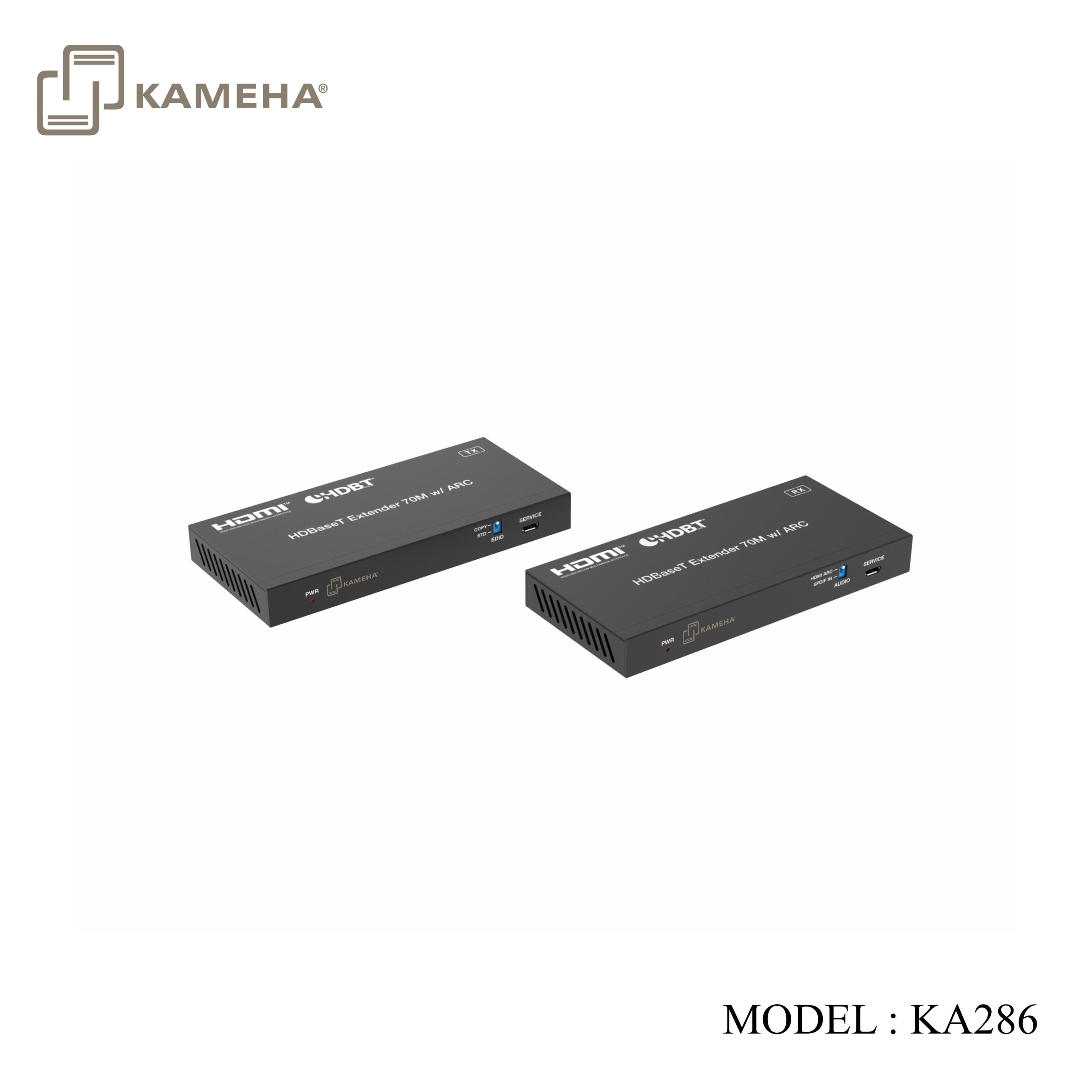
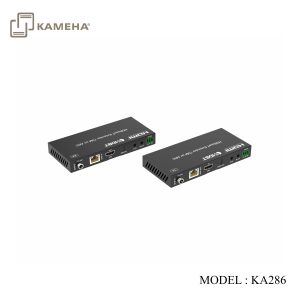
This 18Gbps HDBaseT Extender can extend HDMI signal, bi-directional IR control signal, ARC signal and RS-232 control signal to a distance up to 70m / 230ft via a single CAT5e/6 cable. This product converts HDMI signal to standard HDBaseT signal and transmits it through LAN cable. It can easily control signal source device or display device from the remote end through bi-directional IR signal pass-through function. Video resolution up to 4K2K @60Hz. It supports ARC and POC function. The extender can be widely used in other fields such as video conference system, multimedia signal broadcasting, HDMI signal extension, etc.
Features
- HDMI 2.0b and HDCP 2.2 compliant
- Support 18Gbps video bandwidth
- Support video resolution up to 4K2K@60Hz RGB/YCBCR 4:4:4
- The transmission distance can be extended up to 70m / 230ft via a single CAT5e/6 cable
- Support bi-directional IR and RS-232 control signal pass-through
- Support ARC function, audio formats support Dolby 5.1, DTS 5.1, PCM2.0, etc.
- Advanced EDID management
- Support POC (Power over Cable) function
- Compact design for easy and flexible installation
Specifications
| Technical | |
| HDMI Compliance | HDMI 2.0b |
| HDCP Compliance | HDCP 2.2 |
| Video Bandwidth | 18Gbps |
| Video Resolution | Up to 4K2K@60Hz RGB/YCBCR 4:4:4 |
| IR Level | 5Vp-p |
| IR Frequency | Wideband 20K-60KHz |
| Transmission
Distance |
70m via a single CAT5e/6 cable |
| Color Space | RGB, YCbCr 4:4:4, YCbCr 4:2:2 |
| Color Depth | 8-bit, 10-bit, 12-bit (1080P)
8-bit (4K60) 8-bit, 10-bit, 12-bit (4K24/30) |
| HDR | HDR, HDR10, HDR10+, Dolby Vision, HLG |
| Audio Formats | HDMI: LPCM 7.1CH, Dolby True HD, and DTS-HD Master
Optical: Dolby 5.1, DTS 5.1, PCM 2.0 |
| Connection | |
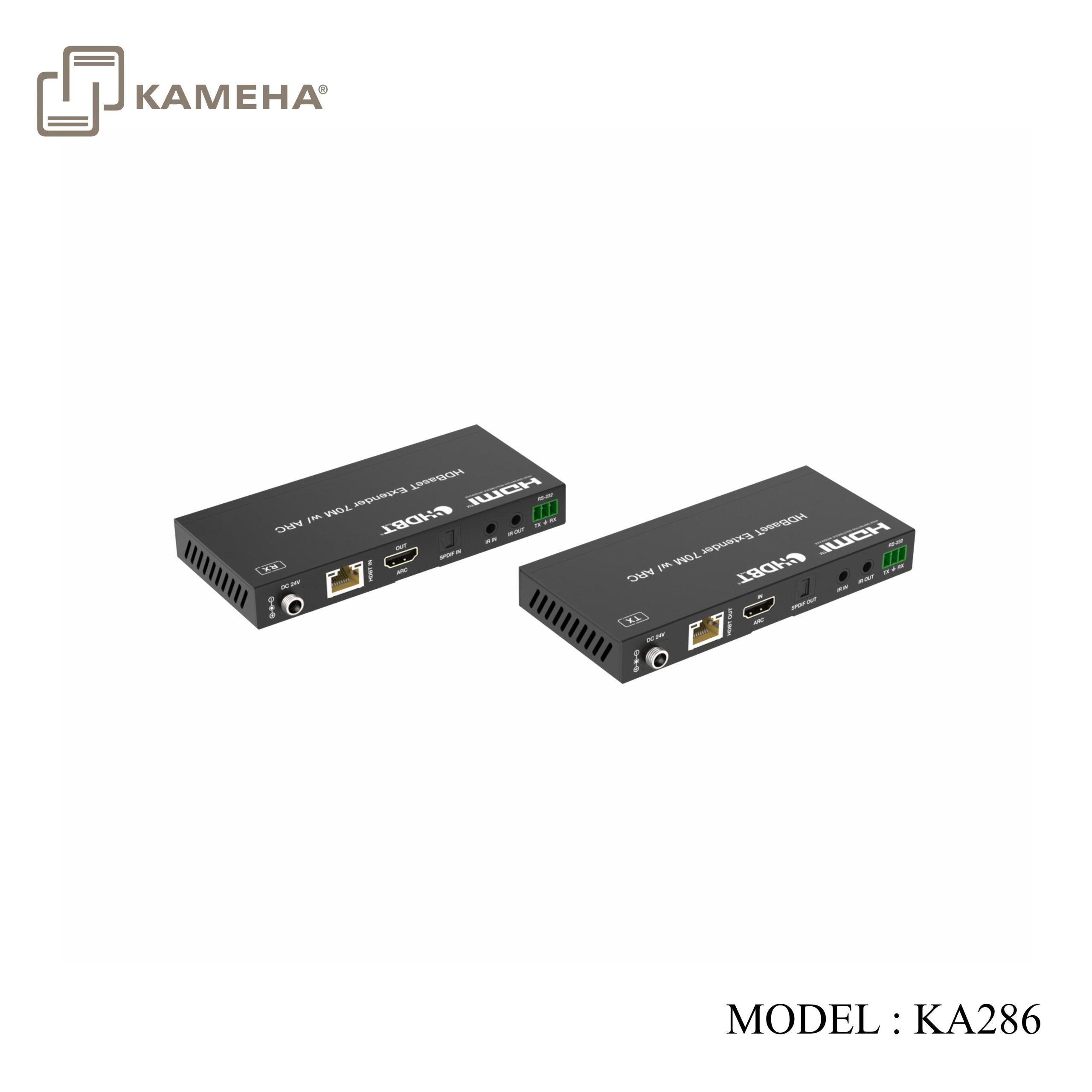
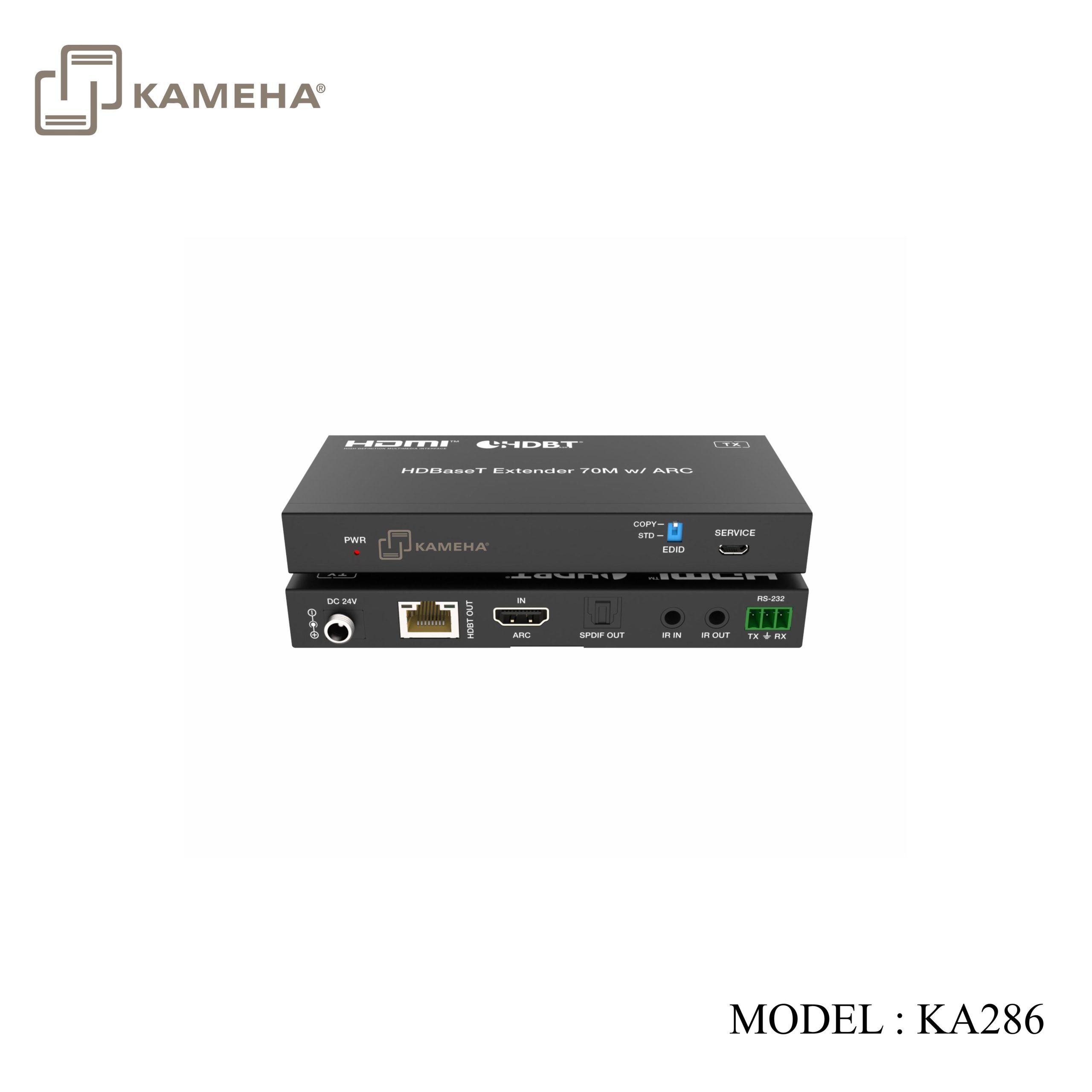
| Transmitter | Input: 1×HDMI IN [TypeA, 19-pin female]
Output: 1×HDBT OUT [RJ45] 1×SPDIF OUT Control: 1×RS-232 [3pin-3.81mm Phoenix connector] 1×SERVICE [Micro-USB jack] 1×IR IN [3.5mm Stereo Mini-jack] 1×IR OUT [3.5mm Stereo Mini-jack] |
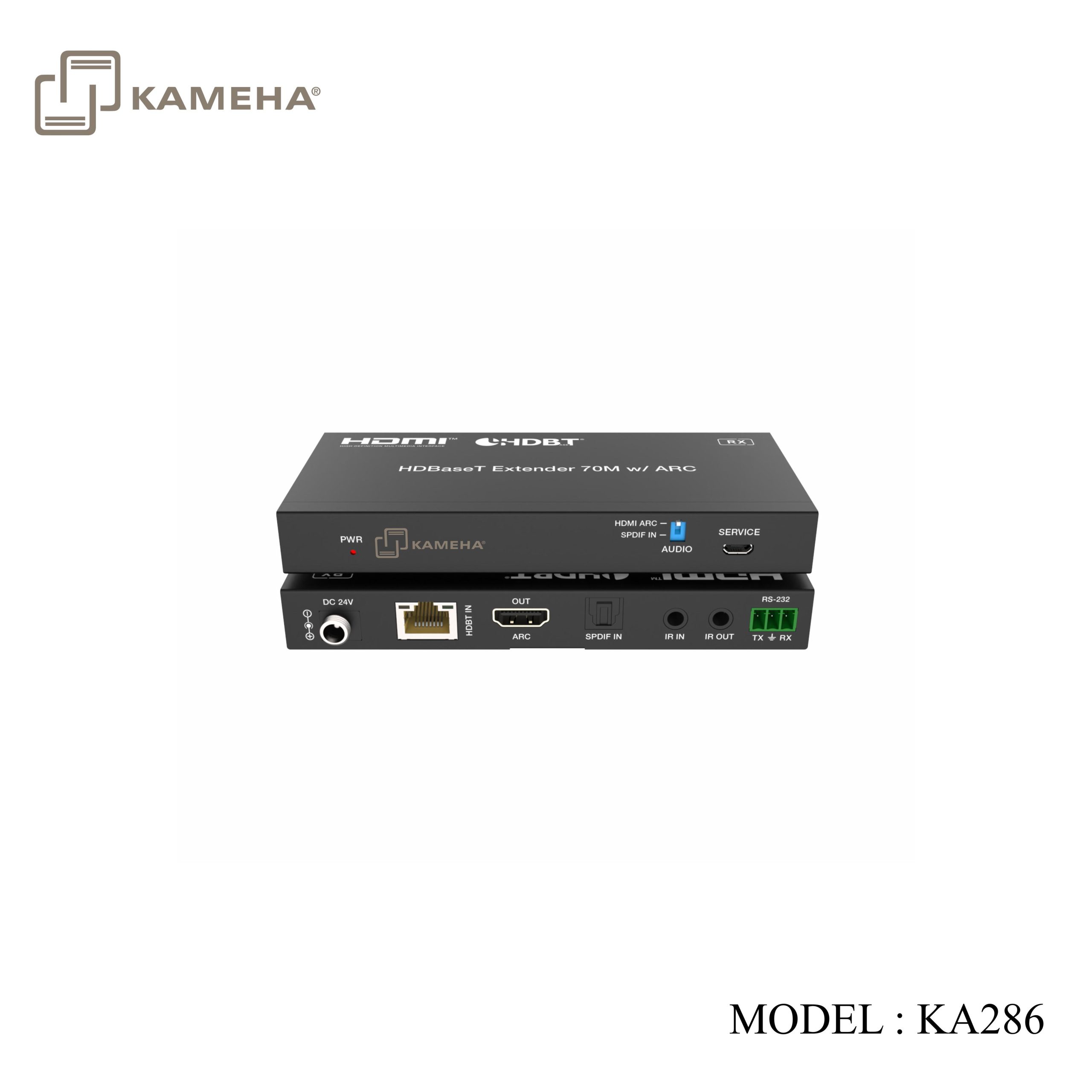
| Receiver | Input: 1×HDBT IN [RJ45]
1×SPDIF IN Output: 1×HDMI OUT [TypeA, 19-pin female] Control: 1×RS-232 [3pin-3.81mm Phoenix connector] 1×SERVICE [Micro-USB jack] 1×IR IN [3.5mm Stereo Mini-jack] 1×IR OUT [3.5mm Stereo Mini-jack] |
| Mechanical | |
| Housing | Metal Enclosure |
| Color | Black |
| Dimensions | Transmitter / Receiver:140mm (W)×65mm (D)×18mm (H) |
| Weight | Transmitter: 235 g, Receiver: 239 g |
| Power Supply | DC 24V/1A;
Support bi-directional POC function |
| Power Consumption | 9.6 W (max) |
| Operating Temperature | 0°C ~ 40°C / 32°F ~ 104°F |
| Storage Temperature | -20°C ~ 60°C / -4°F ~ 140°F |
| Relative Humidity | 20~90% RH (non-condensing) |
Operation Controls and Functions
Transmitter Panel
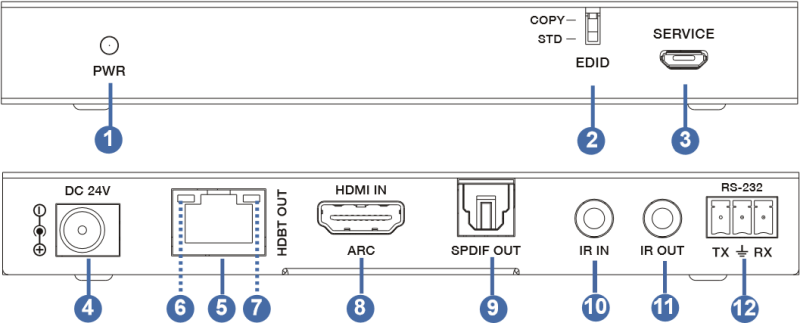
| No. | Name | Function Description |
| 1 | Power LED | The red LED is on when the Transmitter is powered on. |
| 2 | EDID DIP switch | Used for audio EDID setting (dial to COPY by default).
COPY: Copy the EDID of the HDMI OUT port of Receiver. STD: Default 1080P 2CH |
| 3 | SERVICE | Firmware update port. |
| 4 | DC 24V | DC 24V/1A power input port.
Note that the extender supports POC function, it means that either Transmitter or Receiver is connected to 24V/1A power supply, the other doesn’t need power supply. |
| 5 | HDBT OUT | RJ45 connector for connecting the HDBT IN port of the Receiver with CAT5e/6 cable. |
| 6 | Link Signal
Indicator (Green) |
▪ Illuminating: Transmitter and Receiver are in good connection status.
▪ Flashing: Transmitter and Receiver are in poor connection status. ▪ Dark: Transmitter and Receiver are not connected. |
| 7 | Data Signal
Indicator (Orange) |
▪ Illuminating: HDMI signal with HDCP.
▪ Flashing: HDMI signal without HDCP. ▪ Dark: No HDMI signal. |
| 8 | HDMI IN | HDMI signal input port. Connect to HDMI source device with HDMI cable. |
| 9 | SPDIF OUT | Optical fiber audio signal output port. |
| 10 | IR IN | Connect to IR receiver cable, the IR receive signal will emit to the IR OUT port of the Receiver. |
| 11 | IR OUT | Connect to IR blaster cable, the IR emit signal is from the IR IN port of the Receiver. |
| 12 | RS-232 | 3-pin Phoenix connector for RS-232 command transmission. The RS-232 command will pass-through between the Transmitter and Receiver. |
Receiver Panel
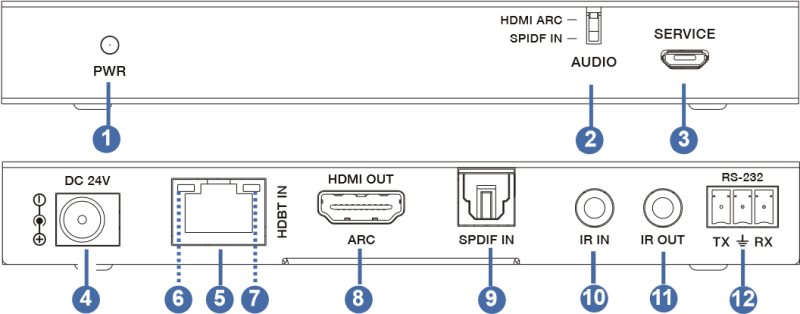
| No. | Name | Function Description | |
| 1 | Power LED | The red LED is on when the Transmitter is powered on. | |
| 2 | AUDIO DIP switch | ▪ When the HDMI IN port is connected to a signal source device with ARC function (e.g. Amplifier or Soundbar), the ARC function of the Extender is enable:
Switch to “HDMI ARC” : the audio returned from the HDMI OUT port of Receiver will be output through the HDMI IN port and SPDIF OUT port of the Transmitter. Switch to “SPDIF IN” : the audio returned from the SPDIF IN port of Receiver will be output through the HDMI IN port and SPDIF OUT port of the Transmitter. ▪ When the HDMI IN port is connected to a common signal source device, the ARC function of the Extender is disable, the audio from the SPDIF IN port of the Receiver will be output through the SPDIF OUT port the Transmitter.
|
|
| 3 | SERVICE | Firmware update port. |
| 4 | DC 24V | DC 24V/1A power input port.
Note that the extender supports POC function, it means that either Transmitter or Receiver is connected to 24V/1A power supply, the other doesn’t need power supply. |
| 5 | HDBT IN | RJ45 connector for connecting the HDBT OUT port of
Transmitter with CAT6/6a cable. |
| 6 | Link Signal
Indicator (Green) |
▪ Illuminating: Transmitter and Receiver are in good connection status.
▪ Flashing: Transmitter and Receiver are in poor connection status. ▪ Dark: Transmitter and Receiver are not connected. |
| 7 | Data Signal
Indicator (Orange) |
▪ Illuminate: HDMI signal with HDCP.
▪ Flash: HDMI signal without HDCP. ▪ Dark: No HDMI signal. |
| 8 | HDMI OUT | HDMI signal output port. Connect to HDMI display devices with HDMI cable. |
| 9 | SPDIF IN | Optical fiber audio signal input port. |
| 10 | IR IN | Connect to the IR receiver cable. The IR signal will send
to the IR OUT port of the Transmitter |
| 11 | IR OUT | Connect to the IR blaster cable, the IR signal is from IR
IN port of the Transmitter. |
| 12 | RS-232 | 3-pin Phoenix connector for RS-232 command transmission.
The RS-232 command will pass-through between the Transmitter and Receiver. |
Application Example
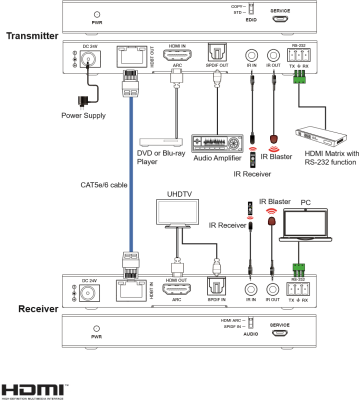
Additional information
| Weight | 0.90 kg |
|---|---|
| Dimensions | 24.50 × 18.50 × 7.50 cm |
| Warranty | 1 Year warranty |
| WHAT'S IN THE BOX | 1* HDMI EXTENDER HDBASE-T POC 18G WITH ARC (Transmitter) |
Related products