
Description
Introduction
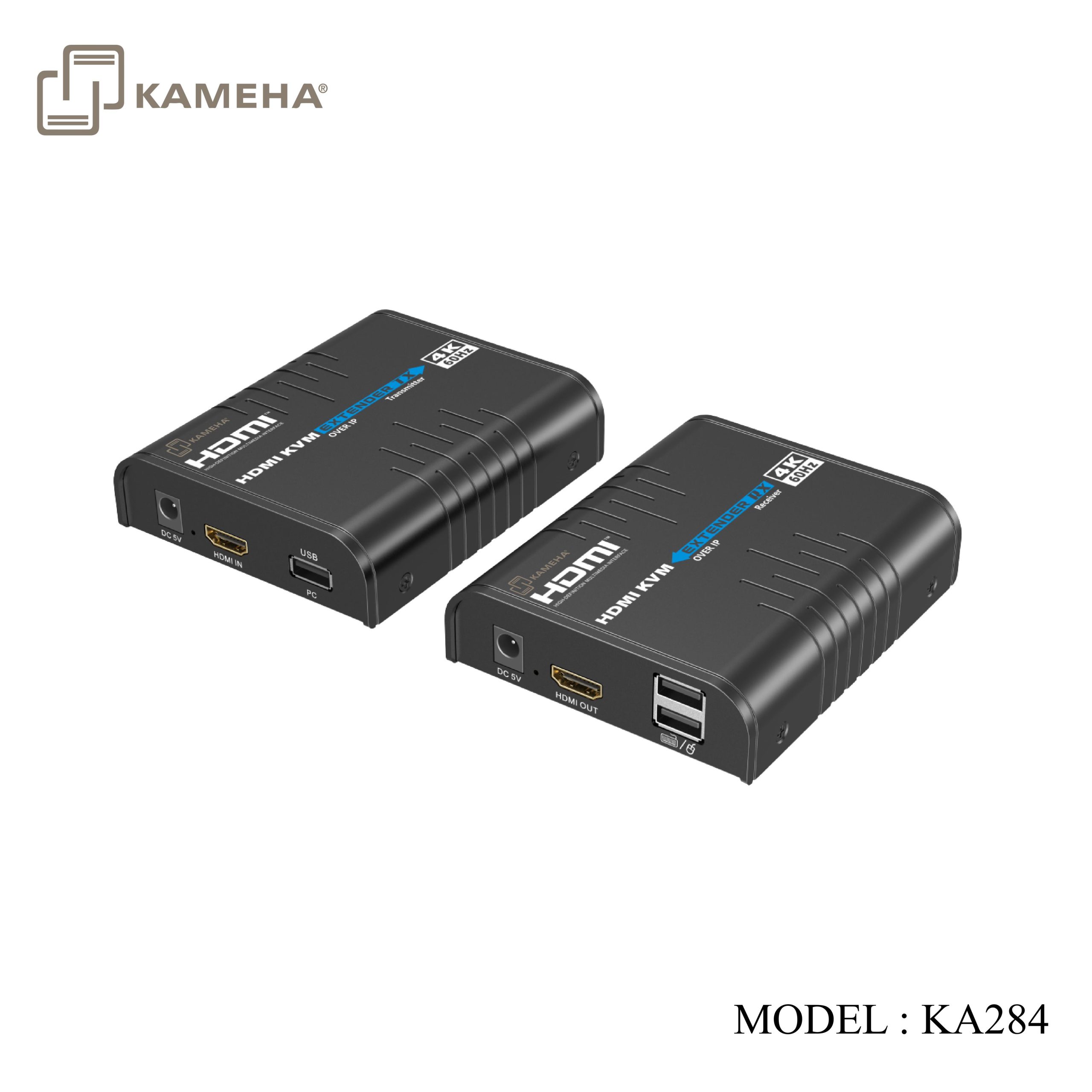
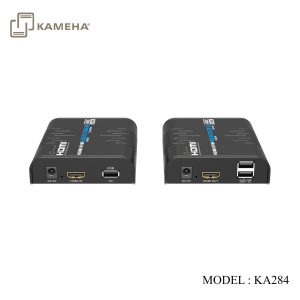
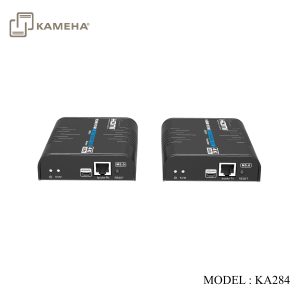
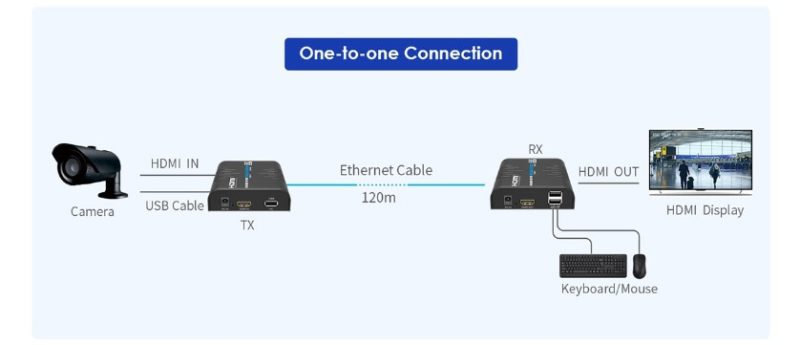
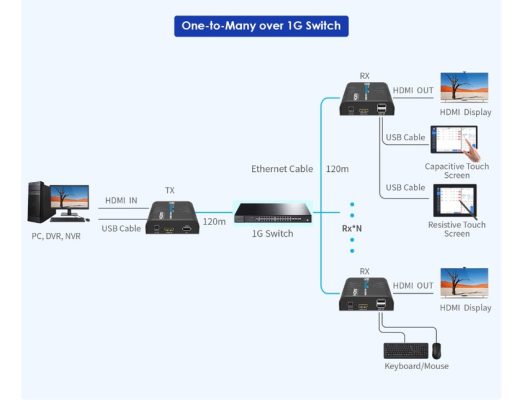
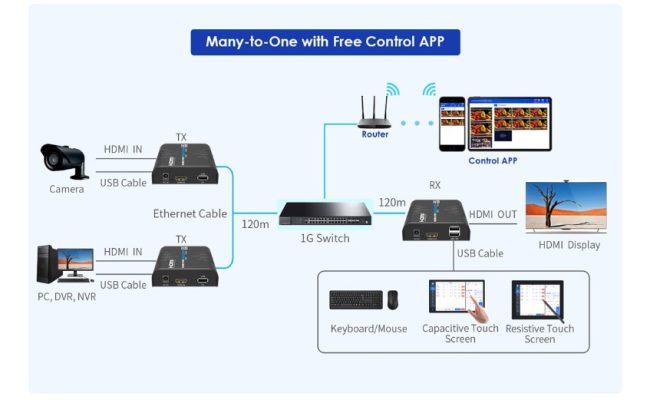
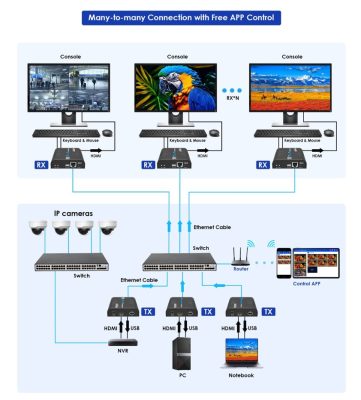
This 4K@60Hz HDMI over IP extender kit, including a transmitter and a receiver, realizing switching, extending and distributing 4K@60Hz audio and video signals via the IGMP switch. The HDMI signal can be extended up to 120 meters over CAT 6 or higher-level networking cables. Supports one-to-one, one-to-many, many-to-one and many-to-many connection. It also supports KVM functions, and can be widely used in audiovisual conference, transportation control center, radio and television, education and training and other fields.
**For one to many connection , using normal gigabit network switch
**For many-to-one or many-to-many connection , using IGMP network switch
Features
- Built on ipcolor STREAM™ technology to deliver high-definition and low-latency transmission.
- Supports up to 4096 x 2160@60Hz resolution, backwards compatible.
- Compatible with Cat5e/6 or higher-level networking cables transmission distance of Cat6 cable is 120 meters.
- Supports one-to-one, one-to-many, many-to-one and many-to-many connection through the IGMP gigabit switch.
- Supports KVM control signal passback.
- Supports 256 signal source inputs and 256 signal outputs.
- Signal sources can be switched via the control software for flexible many-to-many matrix configuration.
- Firmware upgrading via Micro USB port.
- Lightning protection, surge protection, ESD protection.
- Supports stable 24/7 operation.
Technical Parameters
| Item | Transmitter (Tx) | Receiver (Rx) |
| Video | ||
| Input interface | 1x HDMI | 1x RJ45 |
| Output interface | 1x RJ45 | 1x HDMI |
| HDMI length | ≤ 5m | ≤ 5m |
| Maximum
transfer rate |
18Gbps | |
| Compatibility | HDMI 2.0 | |
| HDCP 1.4/HDCP 2.2 | ||
| Resolutions | 4096×2160@24/30/50/60Hz, 3840×2160@24/30/50/60Hz,
1080P@24/25/30/50/60Hz, 720P@50/60Hz, 576P@60Hz, 480P@60Hz, 1920×1200, 1680×1050, 1600×900, 1280×1024, 1280×960, 1280×720, 1024×768, 800×600 |
|
| Connection types | One-to-one connection
One-to-many connection Many-to-one connection Many-to-many connection Switch cascading |
|
| Transmission distance | CAT5 80m / CAT5E 100m / CAT6 120m | |
| Transmission latency | 1080P: 80~110ms
4K@60Hz: 120~170ms |
|
| Audio signal | ||
| Input interface | 1x HDMI | 1x RJ45 |
| Output interface | 1x RJ45 | 1x HDMI |
| HDMI output | LPCM 2.0 | |
| USB devices | ||
| USB | Mouse, keyboard, touch screen | |
| Power | ||
| Power Supply | DC 5V/1A | DC 5V/1A |
| Power Consumption | TX ≤ 3.5W | RX ≤ 2.5W |
| Operating Environment | ||
| Working temperature | – 20℃~60℃ | |
| Storage temperature | – 30℃~70℃ | |
| Humidity | 0~90%RH (no condensation) | |
| Physical Properties | ||
| Housing | Aluminium (Top cover); lron(Bottom cover) | |
| Weight | 240g | 243g |
| Color | Black | |
| Dimensions | 109.6(L)x89.5(w)x26.3(H)mm | |
| Protection | ESD protection
1a Contact discharge level 2 (±4KV) 1b Air discharge level 3 (±8KV) Implementation of the standard: IEC61000-4-2 |
|
| Lightning protection, Surge protection | ||
Panel Description
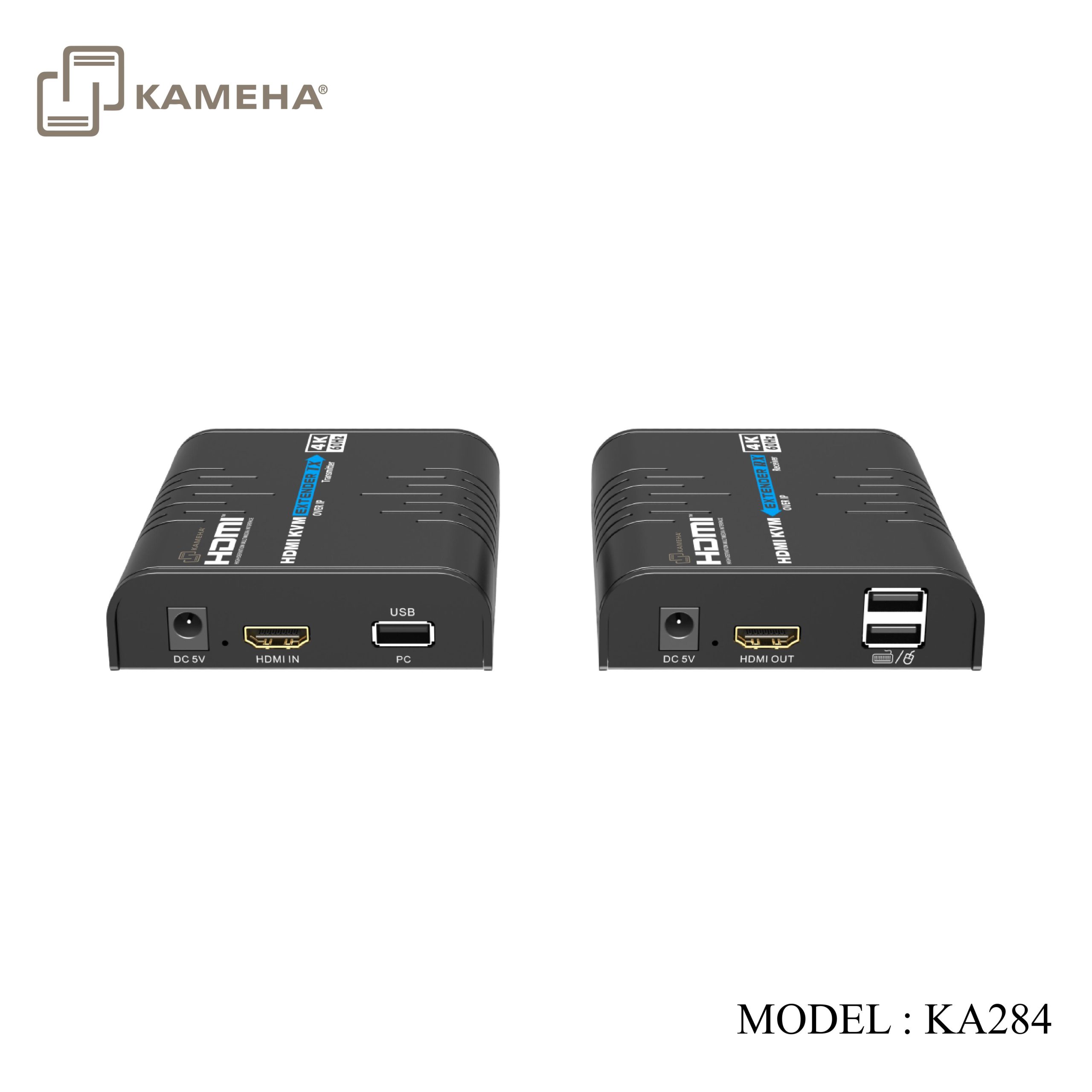
Transmitter (Tx)
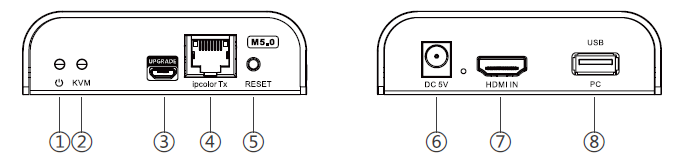
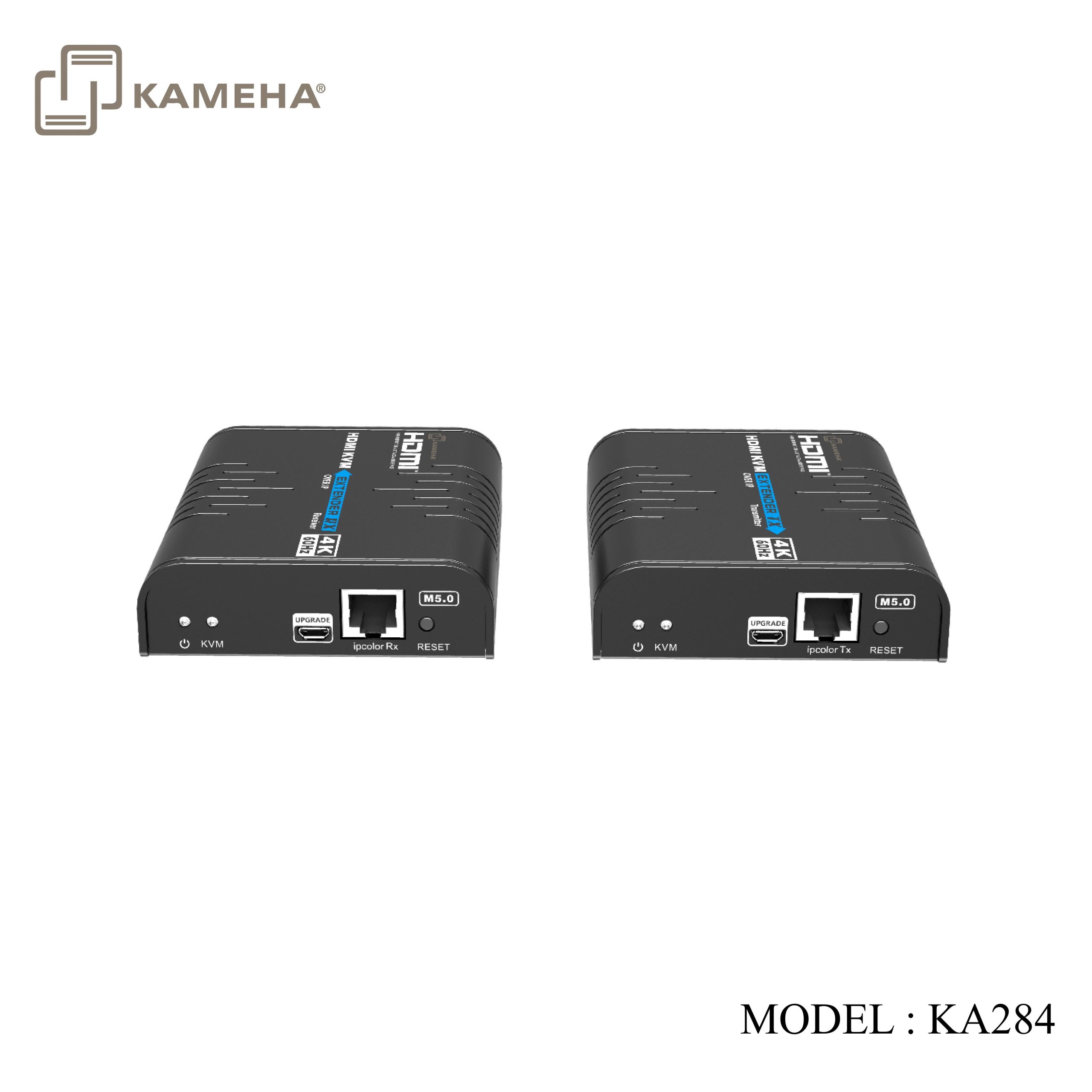
| 1. | Power indicator | The indicator will turn on when power up |
| 2. | KVM indicator | 1) Light flashing: The KVM data is transmitting
2) Steady on: The computer and the USB port are connected |
| 3. | Micro USB port | Used for firmware upgrading |
| 4. | RJ45 signal output | Connect with the network cable |
| 5. | Reset button | 1) Press to restart the device
2) Press and hold for 5 seconds to restore factory settings |
| 6. | Power input | Connect with DC5V/1A power adapter |
| 7. | HDMI input | Connect with the source device |
| 8. | USB port | Connect to the computer with USB cable |
Receiver (Rx)
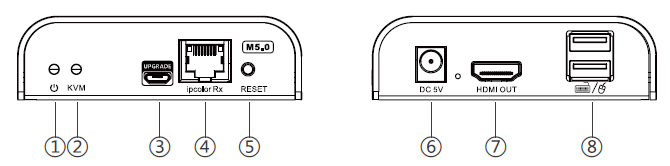
| 1. | Power indicator | The indicator will turn on when power up |
| 2. | KVM indicator | 1) Light flashing: The KVM data is transmitting
2) Steady on: The mouse, the keyboard and touch screen are connected |
| 3. | Micro USB port | Used for firmware upgrading |
| 4. | RJ45 signal input | Connect with the network cable |
| 5. | Reset button | 1) Press to restart the device
2) Press and hold for 5 seconds to restore factory settings |
| 6. | Power input | Connect with DC5V/1A power adapter |
| 7. | HDMI output | Connect with HDMI display device |
| 8. | USB port | Connect with mouse, keyboard and touch screen |


Connection Diagrams
Additional information
| Weight | 0.80 kg |
|---|---|
| Dimensions | 24.00 × 17.50 × 8.00 cm |
| WARRANTY | 1 year warranty |
| WHAT'S IN THE BOX? | 1* HDMI KVM Matrix Extender Receiver |
Related products


Converter


