
Description
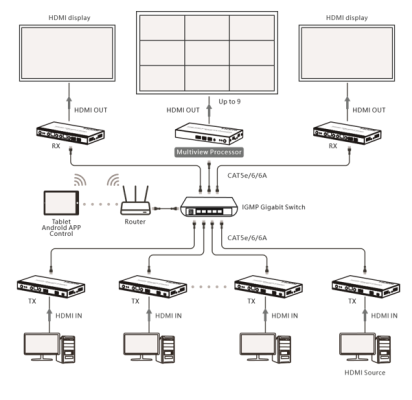
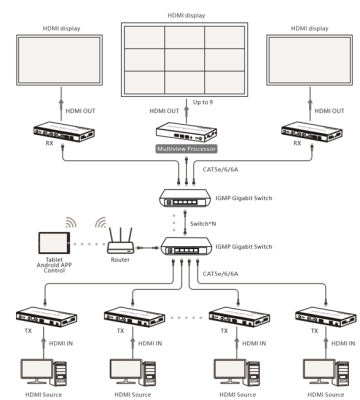
This HDMI multi-view processor is designed for ipcolor Multimedia Control System(iMCS). When using this product, it needs to be paired with the iMCS series products. After connecting to the iMCS Transmitter through an IGMP switch, it can simultaneously receive and process multiple AV signals. Allowing remote control of multiple 4K@60Hz video displays via the iMCS control APP. Utilizing ipcolor STREAM technology to achieve high-definition, low-latency transmission, while supporting other functions such as RS-232 control, RS-485 control, I/O control, and digital audio separation. This product can be widely applied in areas such as audio-visual conferences, dispatch centers, home entertainment, broadcast television, and education and training.
Features
- Built on ipcolor STREAM™ technology to deliver high-definition and low-latency transmission.
- Supports up to 4096 x 2160@60Hz resolution, backwards compatible.
- Compatible with CAT5e/6 and above networking cables, the transmission distance can reach up to 120 meters when using CAT6 or above networking cables. The actual distance may vary slightly due to different switch performances.
- Supports switch cascading.
- Supports RS-232 Control.
- Supports RS-485 Control.
- Supports IR learning remote and control device by APP (20~60KHz).
- Supports I/O interface control.
- Supports POE (Power over Ethernet).
- Support for 3.5mm L/R Channel Audio Separation.
- After connecting to the iMCS over IP matrix, it supports receiving and processing multiple signals simultaneously. Paired with the Imcs APP, allowing remote control of the screen display view, providing four-panel and nine-panel screen view, also adjusting the view size and position freely.
- Firmware upgrading via Micro USB port.
- Lightning protection, surge protection, ESD protection.
- Stable 24/7 operation.
Technical Parameters
| Video | |
| Input interface | 1x RJ45 |
| Output interface | 1xHDMI |
| HDMI length | ≤ 5m |
| Maximum transfer rate | 18Gbps |
| Compatibility | HDMI 2.0 |
| HDCP 1.4/HDCP 2.2 | |
| Resolutions | 4096×2160@24/30/50/60Hz,
3840×2160@24/30/50/60Hz, 1080P@50/60Hz, 720P@50/60Hz, 1920×1200@60Hz, 2560×1440@60Hz |
| Connection types | Regular switch Connection or Switch Cascade |
| Transmission
distance |
Cat6/6A/7≤120m |
| Transmission latency | 180~250ms |
| Audio signal | |
| Input interface | 1x RJ45 |
| Output interface | 1x 3.5mm L/R
1xHDMI |
| HDMI output | LPCM 2.0 |
| 3.5mm audio input/output format | LPCM 2.0 |
| Command Signal | |
| Input interface | 1x 3.5mm IR output
1x 3.5mm IR input |
| IR frequency | 20kHz~60kHz |
| RS-232/RS-485 | Default baud rate: 115200
Supported: 2400, 4800, 9600, 19200, 38400, 57600, 115200 |
| I/O | Output control instructions |
| Power | |
| Power Supply | DC 5V/2A |
| Power
Consumption |
≤ 8W
|
| Operating Environment | |
| Working
temperature |
-20℃~60℃ |
| Storage
temperature |
-30℃~70℃ |
| Humidity | 0~90%RH (no condensation) |
| Physical Properties | |
| Housing | lron |
| Dimensions | 191.0(L)*96.0(W)*25.0(H)mm |
| Weight | 518g |
| Color | Black |
| Protection | ESD protection
1a Contact discharge level 2 (±4KV) 1b Air discharge level 3 (±8KV) Implementation of the standard: IEC61000-4-2 |
| Lightning protection, Surge protection | |
Panel Description
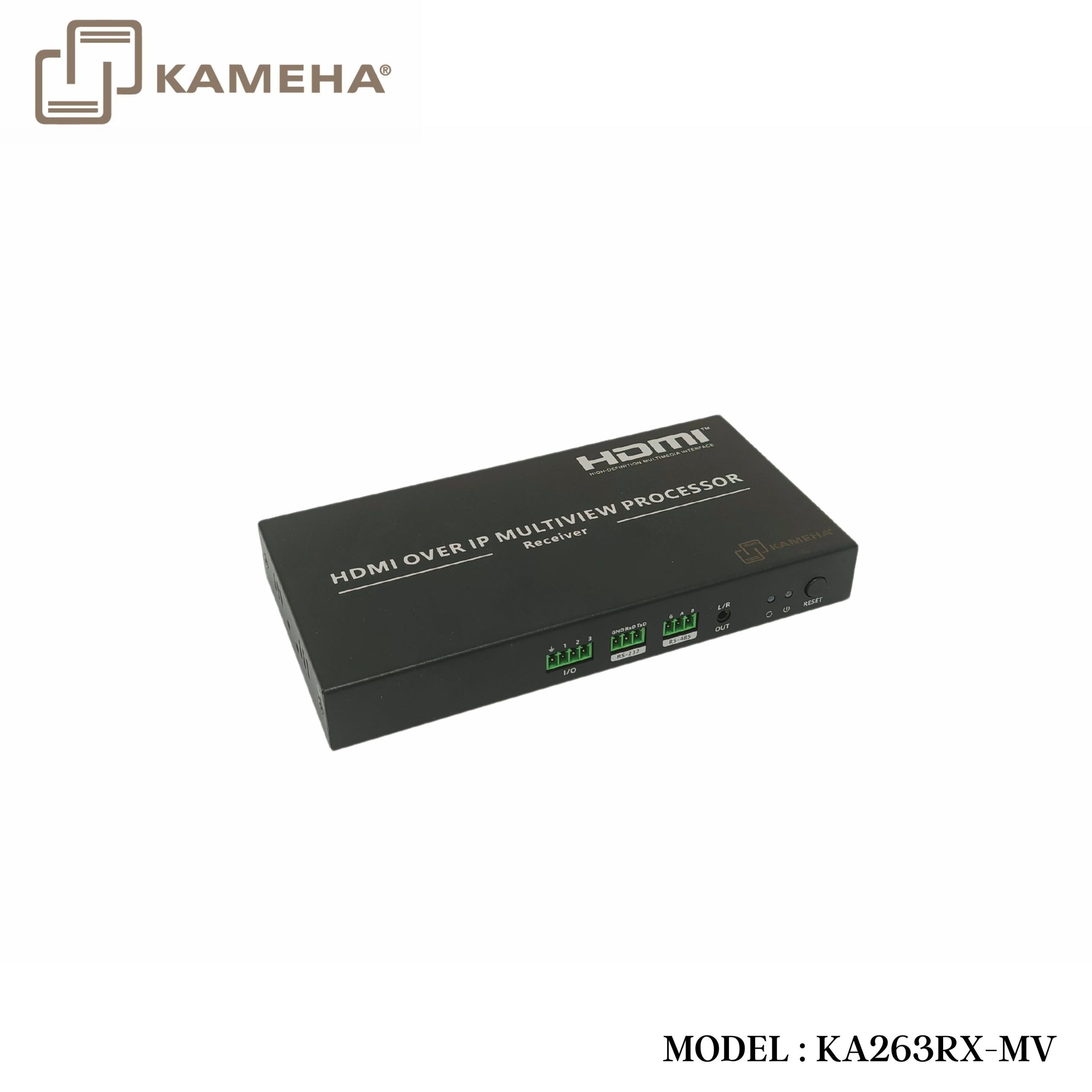
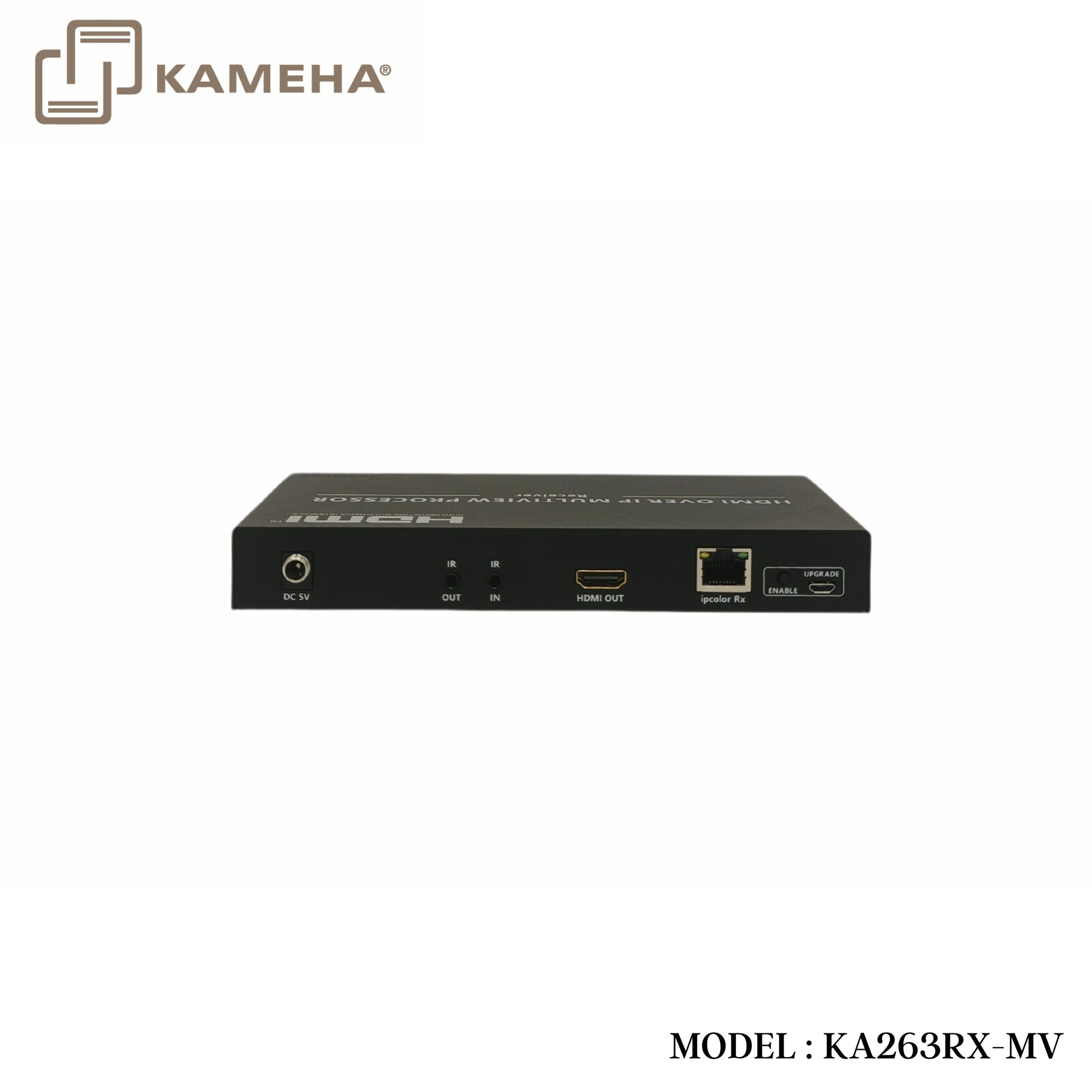
Receiver (Rx)
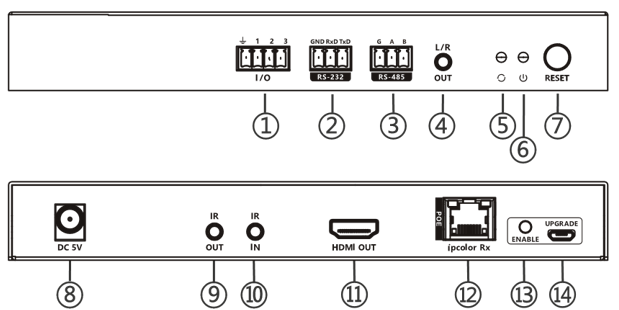
| 1. | I/O interface | Use the terminal block to connect the external
device, and control the output signal via the control APP |
| 2. | RS-232
(GND/RxD/TxD) |
RS-232 control commands for APP |
| 3. | RS-485
(G/A/B) |
RS-485 control commands for APP |
| 4, | L/R output | Connect with the audio device with 3.5mm
stereo audio cable |
| 5. | Status indicator | 1) Light off: The network is not connected
2) Steady on: The network is connected |
| 6. | Power indicator | Indicator lights up when power is applied |
| 7. | Reset | 1) Press to restart the device
2) Press and hold for 5 seconds to restore factory settings |
| 8. | Power | Connect with DC5V/2A power adapter |
| 9. | IR output | Connect with IR blaster extension cable |
| 10. | IR input | Connect with IR receiver extension cable |
| 11. | HDMI output | Connect with HDMI display device |
| 12. | ipcolor Rx | Connect with CAT5e/6 or higher-level
networking cables (PoE input) |
| 13. | ENABLE | Press and hold the upgrade button, then power
the product, 5 seconds later will enter upgrade mode. |
| 14. | Micro USB port | For firmware upgrading |
Connection Diagrams
Regular switch Connection
Switch Cascade
Additional information
| Weight | 0.85 kg |
|---|---|
| Dimensions | 23.70 × 21.50 × 8.00 cm |
| WARRANTY | 1 YEAR WARRANTY |
| WHAT'S IN THE BOX | 1* MV HDMI OVER IP 120M WITH IR 4K60HZ MULTIVIEWER RECEIVER |
Related products




Converter

