


Description
Introduction
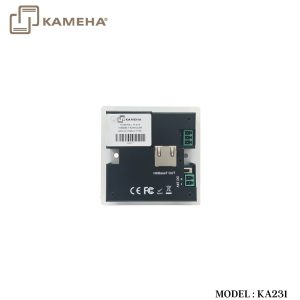
The 4K HDBaseT Wall-plate supports one HDMI input, one DP input and one VGA with audio input within a standard medium 86mm×86mm wall box. The HDBaseT port over a single Cat6/6a cable extends distance up to 229.6ft / 70m with 1080p60Hz and up to 131.2ft / 40m with 4K30 YCbCr4:4:4 .The resolution up to 4K2K@30Hz YCbCr 4:4:4 for HDMI / DP ports and up to 1920×1200@60Hz for VGA port. The product supports manual and automatic switch mode and supports 24V POC function. Built-in two-way RS-232.
Features
- HDMI 1.4, HDCP 1.4 and DP 1.2 compliant
- Support resolution up to 4K2K@30Hz YCbCr 4:4:4 for HDMI / DP ports
- Support resolution up to 1920×1200@60Hz for VGA port
- Support transmission distance up to 229.6ft / 70m with 1080p60Hz and up to 131.2ft / 40m with 4K30Hz YCbCr 4:4:4 over a single Cat6/6a cable.
- Support manual and automatic switch
- Support two-way RS-232
- Medium 86mm×86mm wall box
- Support 24V POC function
Specifications
| Technical | |
| HDMI Compliance | HDMI 1.4 |
| HDCP Compliance | HDCP 1.4 |
| HDMI / DP Video Bandwidth | 10.2Gbps |
| HDMI / DP Video Resolution | Up to 4K2K@30Hz YCbCr 4:4:4 |
| VGA Video Resolution | Up to 1920×1200@60Hz |
| Color Space | RGB, YCbCr 4:4:4, YCbCr 4:2:2 |
| Color Depth | 8-bit (4K2K@30Hz) |
| HDMI/DP Audio formats | LPCM, Dolby Digital/Plus/EX, Dolby True HD, DTS, DTS-EX,DTS-96/24, DTS High Res, DTS-HD Master Audio, DSD |
| VGA Audio formats | LPCM2.0 /48KHz |
| ESD Protection | Human body modelğ±8kV (Air-gap discharge) & ±4kV (Contact discharge) |
| Connections | |
| Transmitter | Inputs: 1x HDMI Type A [19-pin female] 1x VGA [15-pin female] 1x DP [Full size female] 1×AUDIO IN[3.5mm Stereo Mini-jack] Outputs: 1x HDBaseT Out [RJ45] Control: 1x RS-232 [Phoenix jack] |
| Mechanical | |
| Housing | Aluminium Enclosure — Front Panel Metal Enclosure — Rear Panel |
| Color | White — Front Panel Black — Rear Panel |
| Dimensions | 86mm[W] x 86mm[D] x 41mm[H] |
| Weight | 205g |
| Power Supply | DC 24V/1A
or POC |
| Power Consumption | 5W (Max) |
| Operating
Temperature |
32 – 104°F / 0 – 40°C |
| Storage Temperature | -4 – 140°F / -20 – 60°C |
| Relative Humidity | 20 – 90% RH (no condensation) |
Operation Controls and Functions
Front Panel

| Number | Name | Function Description |
| 1 | Power LED | Signal status indicator. The LED will illuminate in green when the HDMI port or the VGA port or the DP port has active signal input. |
| 2 | SOURCE button | Use this manual switch to choose input signal source. |
| 3 | DP LED | The LED will illuminate in green when the DP port is selected and has active signal input simultaneously. |
| 4 | DP IN | DP input port. Connect to DP input signal source with a DP cable. |
| 5 | HDMI LED | The LED will illuminate in green when the HDMI port is selected and has active signal input simultaneously. |
| 6 | HDMI IN | HDMI input port. Connect to HDMI input signal source with an HDMI cable. |
| 7 | AUDIO IN | The VGA audio input port. |
| 8 | VGA LED | The LED will illuminate in green when the VGA port is selected and has active signal input simultaneously. |
| 9 | VGA IN | VGA input port. Connect to VGA input
source with an VGA cable. |
Rear Panel

| Number | Name | Function Description |
|
1 |
RS-232 |
Use the phoenix jack for connect with
PC or control system to transmit RS-232 commands. |
| 2 | HDBaseT OUT | HDBaseT output port. Connect to
HDBaseT receiver with a UTP cable. |
| 3 | POC switch | Use the switch to turn on/off POC function. |
| 4 | DV 24V | DV 24V power input port. |
POC (Power over Cable) Application Example
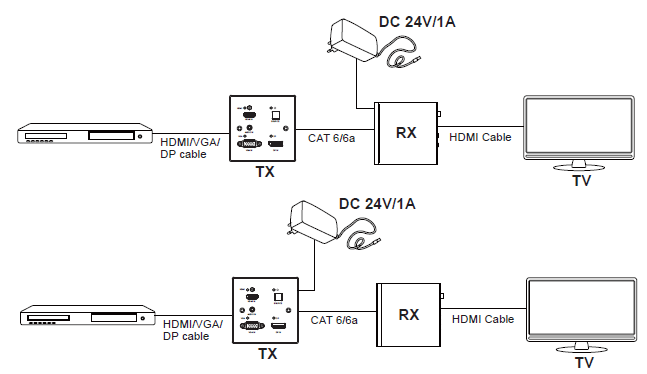
Bidirectional RS-232 control Application Example

Application Example

Additional information
| Weight | 0.99 kg |
|---|---|
| Dimensions | 22.00 × 13.00 × 14.00 cm |
| Warranty | 1 Year Warranty |
| WHAT'S IN THE BOX | 1× 4K HDBaseT Wall-plate Transmitter |
Related products