




Description
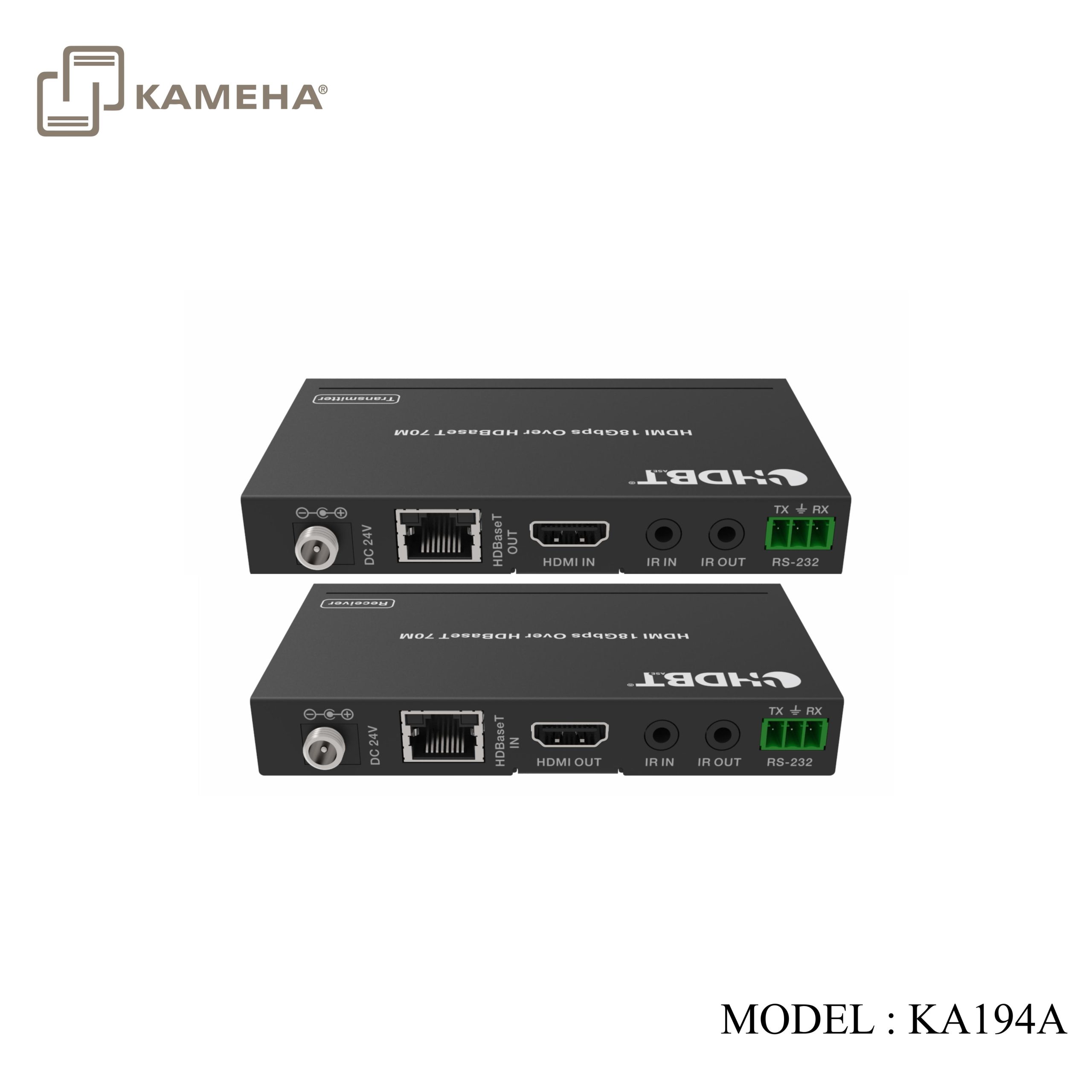
The 18Gbps HDMI Extender is a tool which can extend your HDMI signal over 230fts/70meters to a compatible display. It is designed to convert HDMI signal to standard HDBase-T signal which can be transmitted by LAN cable. It also supports Transfer Bidirectional Infrared control signal together with the HDMI signal, so you can control the Source in the Sink side, which is 230fts outside, also you can control the Sink in the Source side which is 230fts outside by using the HDMI Extender.
Features
- HDMI 2.0b (18Gbps), HDCP 2.2 and DVI compliant
- Video resolutions up to 4K2K@50/60Hz (YUV444)
- 10bits HDR (High Dynamic Range) pass through
- Supports HDMI High Bit Rate (HBR) audio pass through
- Supports CEC bypass
- Optical audio supports LPCM 2CH, Dolby Digital 2/5.1CH, DTS 2/5.1CH
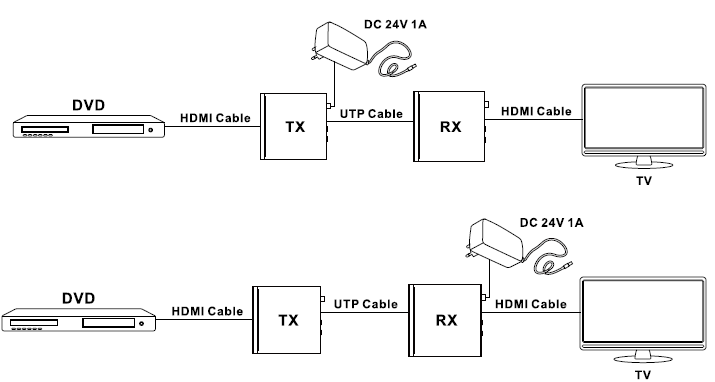
- POC (Power Over Cable) function is supported, either TX or RX is powered by 24V@1A power supply, the another does not need power supply from the DC jack. POC Power consumption is less than 10W.
POC (Power Over Cable) Application Example
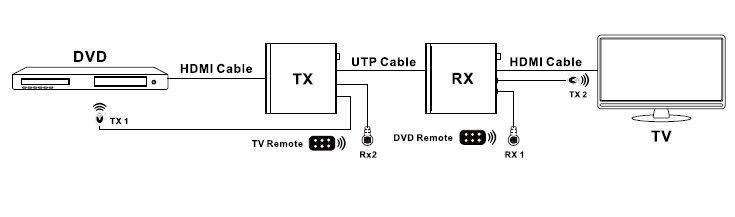
- Transfer Bidirectional Infrared control signal together with the HDMI signal.
Bidirectional Infrared control Application Example
- Transfer Bidirectional RS-232 control signal together with the HDMI signal.
Bidirectional RS-232 control Application Example

- Transmission distance: Over CAT6 cable
70 meters: 1080P @60Hz36bit; 3D1080P@30Hz36bit;
40 meters: 1080P @60Hz@48bit; 1080P @120Hz@24bit;3D1080P@60Hz@36bit;
4K x2K@[email protected]@50/60Hz (YUV420), 4K2K@50/60Hz (YUV444)
Specifications
| Technical | ||
| HDMI Compliance | HDMI 2.0b | |
| HDCP Compliance | HDCP 2.2 and HDCP 1.4 | |
| Video Bandwidth | 18 Gbps | |
| Video Resolutions | Up to 4K2K@50/60Hz (YUV 4:4:4), 4K2K@30Hz, 1080P@120Hz, and 1080P 3D@60Hz | |
| Color Space | RGB, YCbCr 4:4:4, YCbCr 4:2:2 | |
| Color Depth | 10-bit, 12-bit | |
| HDMI Audio Formats (Pass-through) | LPCM 2/5.1/7.1CH, Dolby Digital, DTS 5.1, Dolby Digital+, Dolby TrueHD, DTS-HD Master Audio, Dolby Atmos, DTS:X | |
| Optical Audio Formats | LPCM 2CH, LPCM 5.1, Dolby Digital 2/5.1CH, DTS 2/5.1CH | |
| ESD Protection | Human body model- ±8kV (air-gap discharge) & ±4kV (contact discharge) | |
| Connections | ||
| Inputs | Transmitter: 1x HDMI Type A (19-pin female) 1x IR INPUT (3.5mm Stereo Mini-jack) 1x RS-232 (Phoenix jack) Receiver: 1x HDBaseT In (RJ45) 1x IR INPUT (3.5mm Stereo Mini-jack) 1x RS-232 (Phoenix jack) |
|
| Outputs | Transmitter: 1x HDBaseT Out (RJ45) 1x IR OUTPUT (3.5mm Stereo Mini-jack)Receiver:1x HDMI Type A (19-pin female) 1x IR INPUT (3.5mm Stereo Mini-jack) |
|
| Mechanical | ||
| Housing | Metal Enclosure | |
| Color | Black | |
| Dimensions | 115mm (W) x 65mm (D) x 17mm (H) | |
| Weight | 405g | |
| Power supply | Input: AC100 – 240V 50/60Hz Output: DC 24V/1A (US/EU standards, CE/FCC/UL certified) |
|
| Power Consumption | 24W (Max) | |
| Operation Temperature | 32 – 104°F/ 0 – 40°C | |
| Storage temperature | -4 – 140°F/ -20 – 60°C | |
| Relative Humidity | 20 – 90% RH (no condensation) | |
Operation Control and Functions
Transmitter

- Power LED: System power indicator.
- DC 24V: Connect 24V/1A adaptor to AC wall outlet for power supply.
- HDBaseT Out: Standard HDBaseT signal output port. Connect HDBaseT receiver with a UTP cable following the standard of direct interconnection method
- HDMI In: Connect this to HDMI source devices such as Blu-ray or PS4 player
- IR In: Channel 2 IR Receiver. Connect with Wideband IR Rx.
- IR Out: Channel 1 IR Transmitter. Connect with Wideband IR Tx.
- RS-232: Phoenix jack provide Serial port control signal between transmitter and receiver.
- Connection Signal Indicator Lamp
lluminate: The Transmitter and Receiver are in good connections status.
Flashing: The Transmitter and Receiver are in poor connections status.
Dark: The Transmitter and Receiver are not connected. - Data Signal Indicator Lamp
Illuminate: The HDMI signal with HDCP.
Flashing: The HDMI signal without HDCP.
Dark: No HDMI signal.
Receiver
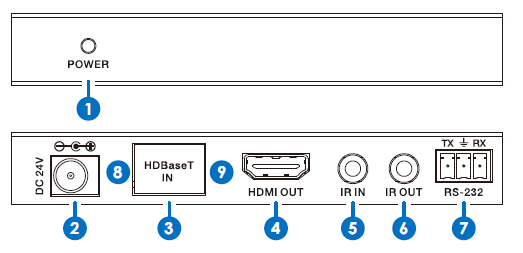
- Power LED: System power indicator.
- DC 24V: Connect 24V/1A adaptor to AC wall outlet for power supply
- HDBaseT In: Standard HD BaseT signal input port. 3 Connect HDBaseT Transmitter with a UTP cable following the standard of direct interconnection method.
- HDMI Out: HDMI output port. This slot is where you connect the HDTV or monitor with HDMI cable.
- IR In: Channel 1 IR Receiver. Connect with Wideband IR Rx
- IR Out: Channel 2 IR Transmitter. Connect with Wideband IR Tx.
- RS-232: Phoenix jack provides serial port control signal between transmitter and receiver.
- Connection Signal Indicator Lamp
Illuminate: The Transmitter and Receiver are in good connections status.
Flashing: The Transmitter and Receiver are in poor connections status.
Dark: The Transmitter and Receiver are not connected. - Data Signal Indicator Lamp
Illuminate: The HDMI signal with HDCP.
Flashing: The HDMI signal without HDCP.
Dark: No HDMI signal.
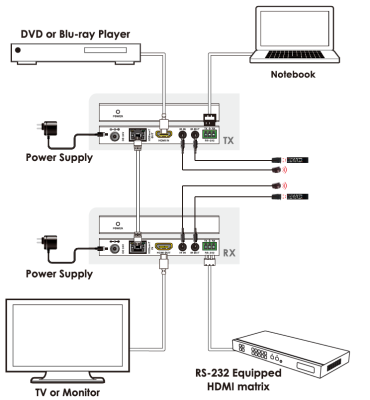
Connection Diagram
Additional information
| Weight | 0.80 kg |
|---|---|
| Dimensions | 21.70 × 16.00 × 7.00 cm |
| Warranty | 1 year warranty |
| What's in the box? | 1* HDMI 18Gbps Transmitter |
Related products


RM536.00


RM26,025.00



Out of stock
RM2,520.00


RM150.00


RM1,071.00


RM315.00


RM1,103.00