
Description
Introduction
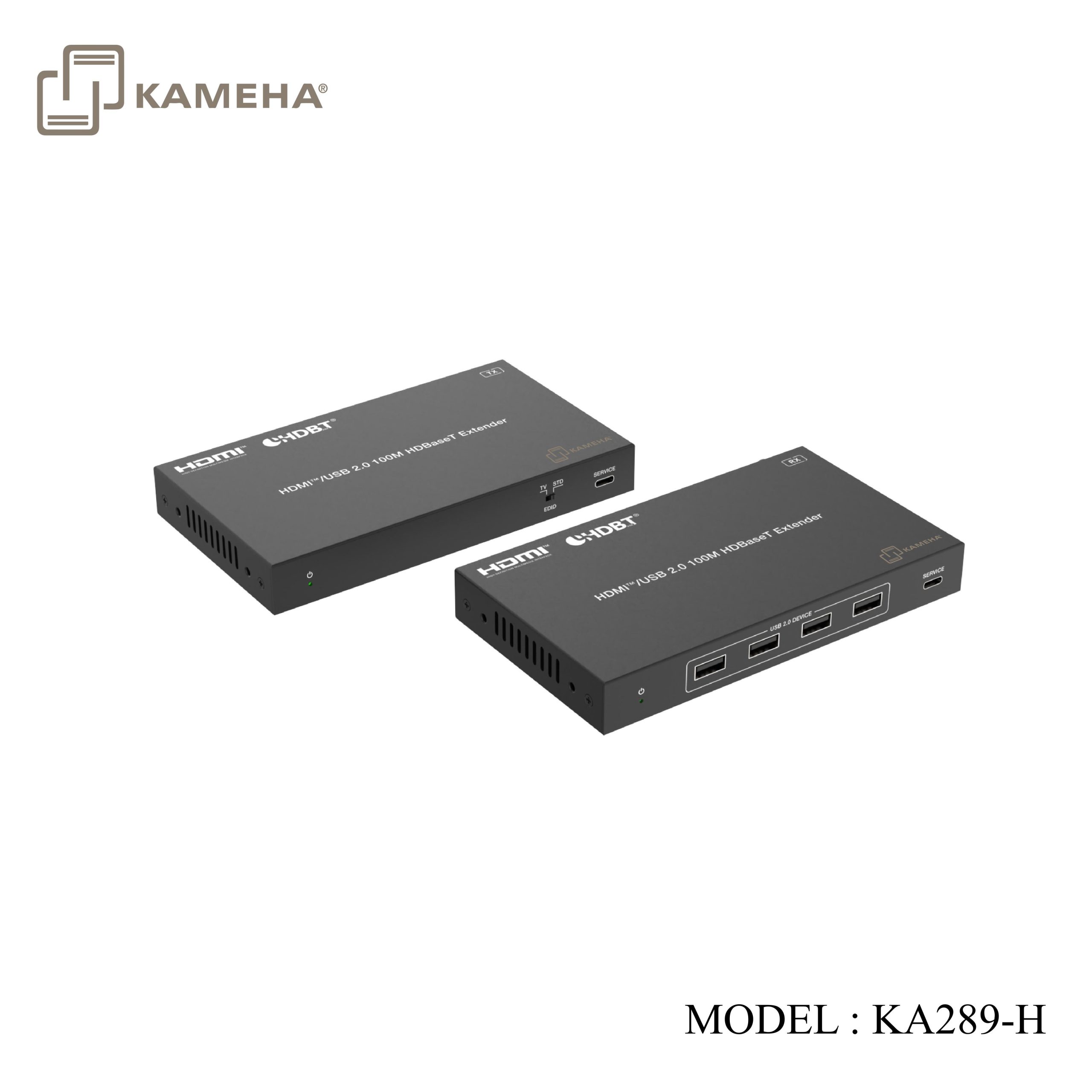
This is a high-performance, long-reach HDBaseT extender, which can transmit HDMI™, IR, RS-232 and USB 2.0 signal to a long distance up to 100m/328ft over CAT5e/6 cable. Video resolution is up to 4K@60Hz (4:4:4). It converts the HDMI™ signal to standard HDBaseT signal and transmits it via LAN cable. It can easily control the source device or display device from the remote end through CEC and bi-directional IR signal pass-through function. It supports EDID management (COPY TV/STD) and PoC function. The Extender can be widely used in other fields such as video conference system, multimedia signal broadcasting, HDMI™ signal extension, etc
*** This model can mix and match with KA289-C and allows USB-C signal input with HDMI signal output or vice versa. Please check with our sales representatives for details. For model KA289-C , click on this link: KA289-C
- HDCP 2.3/2.2/1.x compliant
- Video bandwidth is up to 18Gbps
- Video resolution is up to 4K@60Hz (4:4:4), as specified in HDMI™ 2.0b
- The transmission distance is up to 100m/328ft via CAT5e/6 cable
- USB 2.0 signal transmission
- Support bi-directional IR, RS-232 control signal and CEC pass-through
- HDMI™ audio formats: LPCM, Dolby Digital/Plus/EX, Dolby True HD, Dolby Atmos, DTS, DTS-EX, DTS-96/24, DTS High Res, DTS-HD Master Audio, DTS:X
- Support audio de-embedding on the Receiver
- Advanced EDID management
- HDR, HDR10, HDR10+, Dolby Vision, HLG pass-through
- Bi-directional PoC (Power over Cable) function
- Compact design for easy and flexible installation
Specifications
| Technical | |
| HDMI™ Compliance | HDMI™ 2.0b |
| HDCP Compliance | HDCP 2.3/2.2/1.x |
| Video Bandwidth | 18Gbps |
| Video Resolution
(Input & Output) |
Up to 4K@60Hz (4:4:4)
* All available resolutions are shown as follow. |
| IR Level | 5Vp-p |
| IR Frequency | Wideband 20K-60KHz |
| Color Space | RGB, YCbCr_4:4:4, YCbCr_4:2:2, YUV_4:2:0 |
| Color Depth | 8/10/12-bit |
| HDR | HDR, HDR10, HDR10+, Dolby Vision, HLG |
| CEC | Supported |
| HDMI™ Audio
Format |
LPCM, Dolby Digital/Plus/EX, Dolby True HD, Dolby Atmos,
DTS, DTS-EX, DTS-96/24, DTS High Res, DTS-HD Master Audio, DTS:X |
| Transmission
Distance |
100m/328ft for 4K@60Hz over CAT5e/6 cable |
| ESD Protection | IEC 61000-4-2:
±8kV (Air-gap discharge) & ±4kV (Contact discharge) |
| Connection | |
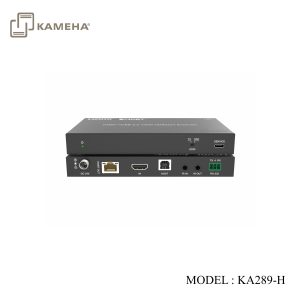
| Transmitter | Input: 1× IN [HDMI™ Type A, 19-pin female]
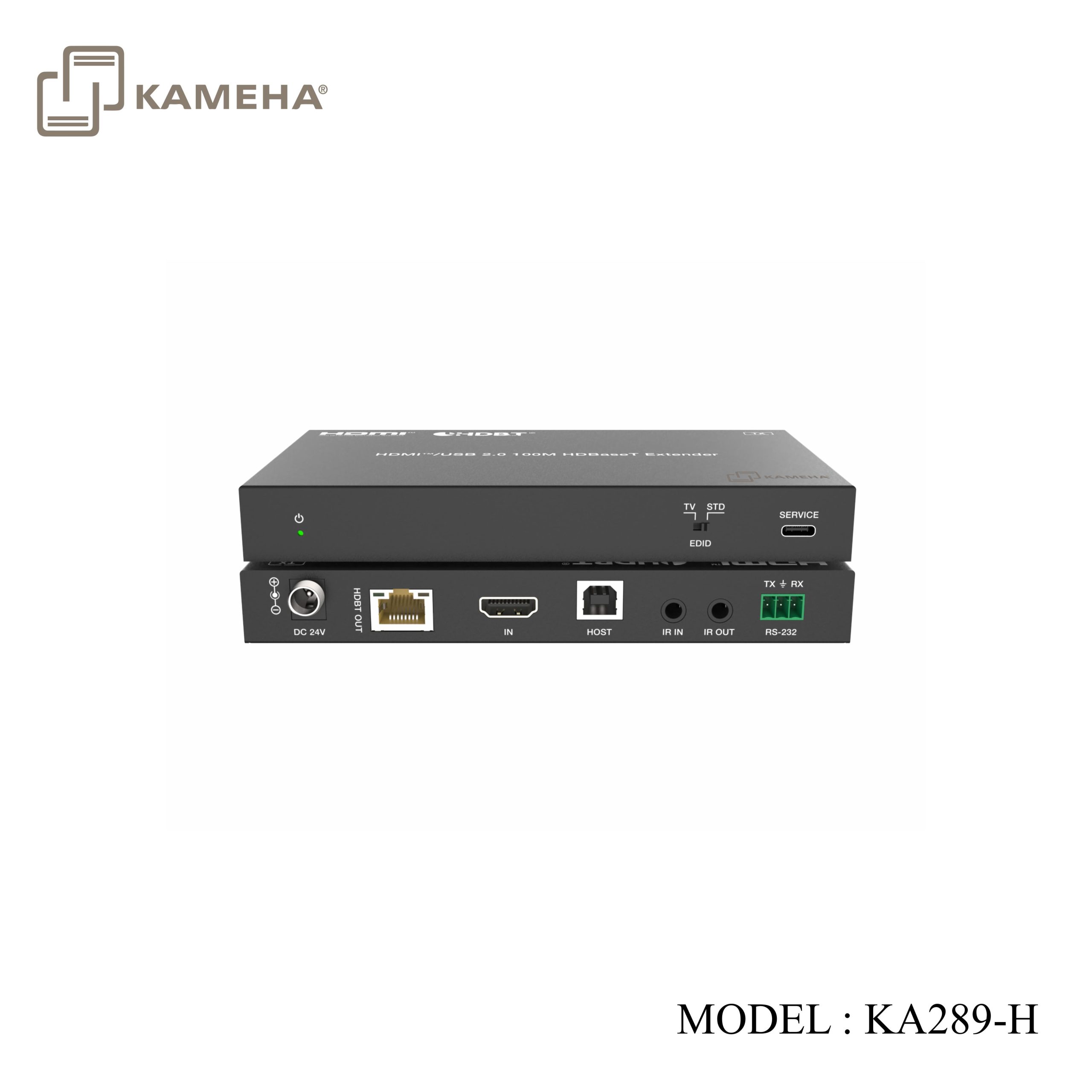
Output: 1× HDBT OUT [RJ45] Control: 1× HOST [USB-B, 4-pin female] 1× IR IN [3.5mm audio jack] 1× IR OUT [3.5mm audio jack] 1× RS-232 [3pin-3.5mm phoenix connector] 1× SERVICE [USB-C] |
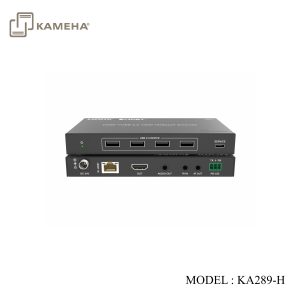
| Receiver | Input: 1× HDBT IN [RJ45]
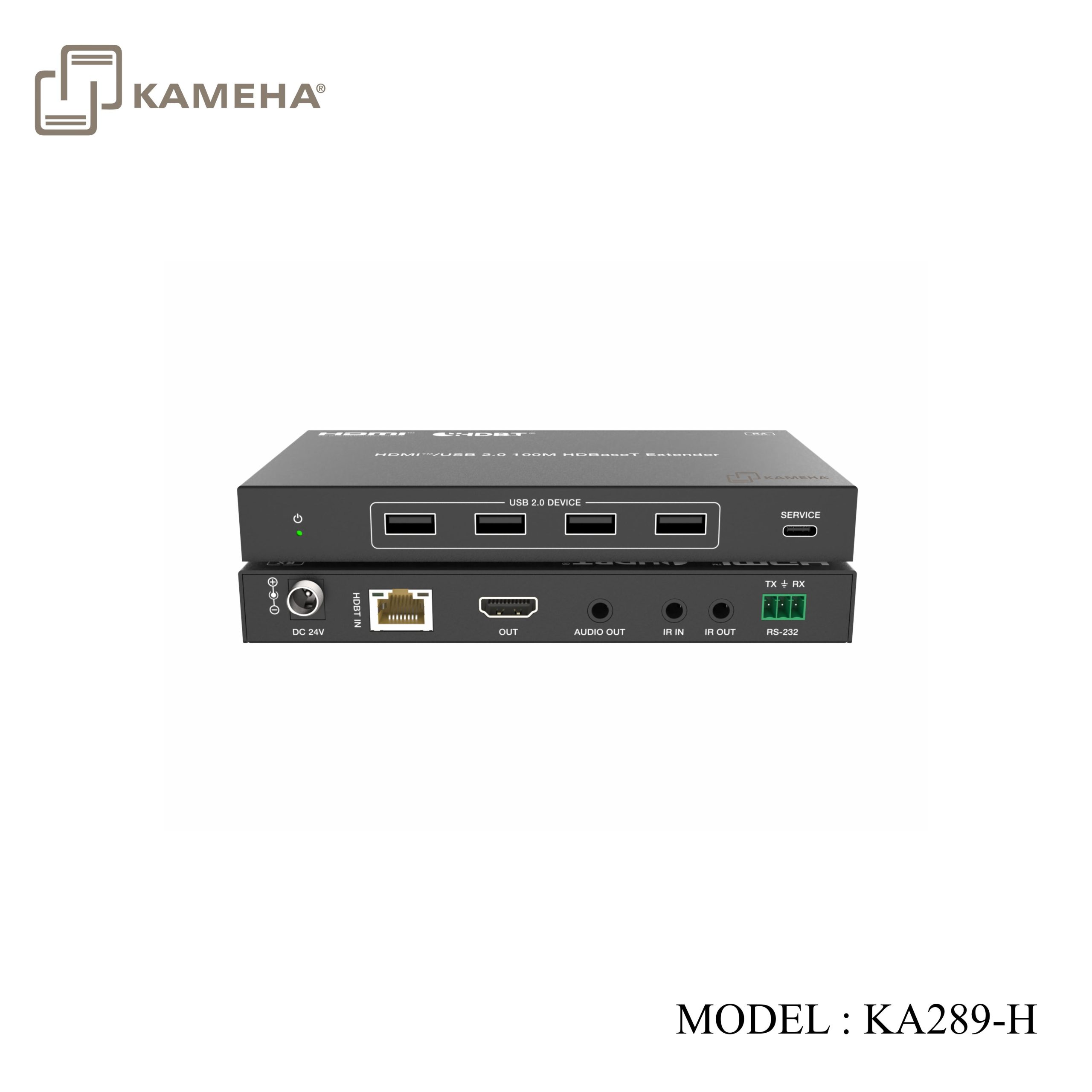
Output: 1× OUT [HDMI™ Type A, 19-pin female] 1× AUDIO OUT [3.5mm audio jack] Control: 4× USB 2.0 DEVICE [USB-A, 9-pin female] 1× IR IN [3.5mm audio jack] 1× IR OUT [3.5mm audio jack] 1× RS-232 [3pin-3.5mm phoenix connector] 1× SERVICE [USB-C] |
| Mechanical | |
| Housing | Metal Enclosure |
| Color | Black |
| Dimensions | Transmitter/Receiver: 157mm (W) × 88mm (D) × 20mm (H) |
| Weight | Transmitter: 371g; Receiver: 378g |
| Power Supply | DC 24V/1A; Support bi-directional PoC function |
| Power Consumption | (PoC) Transmitter: 28.32W; (PoC) Receiver: 25.68W |
| Operating Temperature | 0°C ~ 40°C / 32°F ~ 104°F |
| Storage Temperature | -20°C ~ 60°C / -4°F ~ 140°F |
| Operating Humidity | 20%~80% (relative humidity, non-condensing) |
| Storage Humidity | 10%~90% (relative humidity, non-condensing) |
Operation Controls and Functions
Transmitter Panel
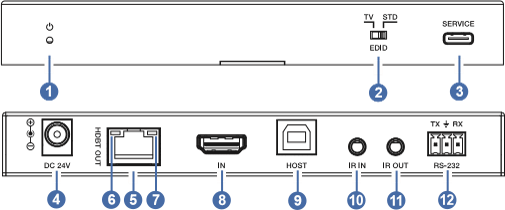
| No. | Name | Function Description |
| 1 | PWR LED | The green LED is on when the Transmitter is powered on. |
| 2 | EDID DIP switch | Used for EDID setting.
TV: Copy EDID from the connected display device on RX. STD: Standard EDID (4K60 4:4:4 SDR 2CH). |
| 3 | SERVICE | USB-C port, used for firmware update. |
| 4 | DC 24V | DC 24V/1A power input port.
Note that the extender supports POC function, it means that either Transmitter or Receiver is connected to 24V/1A power supply, the other doesn’t need power supply. |
| 5 | HDBT OUT | HDBT output port, connected to the HDBT IN port on the Receiver with CAT cable. |
| 6 | Link Signal
Indicator (Green) |
▪ On: Transmitter and Receiver are connected and linked.
▪ Off: Transmitter and Receiver are not connected. |
| 7 | Data Signal
Indicator (Yellow) |
▪ On: HDMI signal with HDCP.
▪ Flashing: HDMI signal without HDCP. ▪ Off: No HDMI signal. |
| 8 | HDMI IN | HDMI signal input port, connected to source device with HDMI cable. |
| 9 | HOST | USB host port, connected to a PC. |
| 10 | IR IN | Connects to IR receiver cable. The IR signal will be emit to the IR OUT port on the Receiver. |
| 11 | IR OUT | Connects to IR blaster cable. The IR signal is from the IR IN port on the Receiver. |
| 12 | RS-232 | 3-pin phoenix connector, used for RS-232 command transmission between the Transmitter and Receiver. |
Receiver Panel
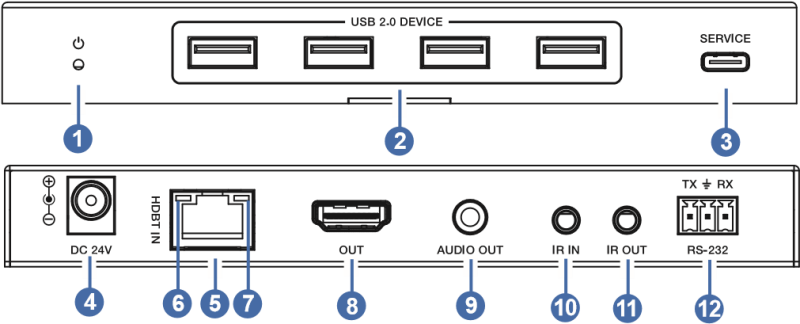
| No. | Name | Function Description |
| 1 | PWR LED | The green LED is on when the Receiver is powered on. |
| 2 | USB 2.0
DEVICE |
USB 2.0 type A ports, connected to USB 2.0 devices such as U disk, USB camera, keyboard and mouse.
Note: If the left two ports are both connected, the power output of the two ports are limited to share 1A; If only one is connected, the power output of each port is 1A. The right two ports are the same. |
| 3 | SERVICE | USB-C port, used for firmware update. |
| 4 | DC 24V | DC 24V/1A power input port.
Note that the extender supports POC function, it means that either Transmitter or Receiver is connected to 24V/1A power supply, the other doesn’t need power supply. |
| 5 | HDBT IN | HDBT input port, connected to the HDBT OUT port of the Transmitter with CAT cable. |
| 6 | Link Signal
Indicator (Green) |
▪ On: Transmitter and Receiver are connected and linked.
▪ Off: Transmitter and Receiver are not connected. |
| 7 | Data Signal
Indicator (Yellow) |
▪ On: HDMI signal with HDCP.
▪ Flashing: HDMI signal without HDCP. ▪ Off: No HDMI signal. |
| 8 | HDMI OUT | HDMI signal output port, connected to display device such as TV or monitor with HDMI cable. |
| 9 | AUDIO OUT | Analog audio output port, connected to an audio device. |
| 10 | IR IN | Connects to IR receiver cable. The IR signal will be emitted to the IR OUT port of the Transmitter. |
| 11 | IR OUT | Connects to IR blaster cable. The IR signal is from the IR IN port of the Transmitter. |
| 12 | RS-232 | 3-pin phoenix connector, used for RS-232 command transmission between the Transmitter and Receiver. |
Application Example
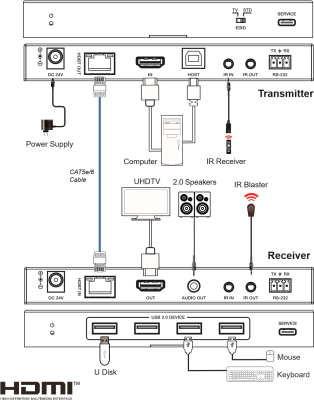
Additional information
| Weight | 1.3 kg |
|---|---|
| Dimensions | 26.5 × 21.2 × 7 cm |
| WARRANTY | 1 YEAR WARRANTY |
| WHAT'S IN THE BOX | 1* 4K60 HDMI™ over HDBaseT Extender (Transmitter) |
Related products


