


Description
Introduction
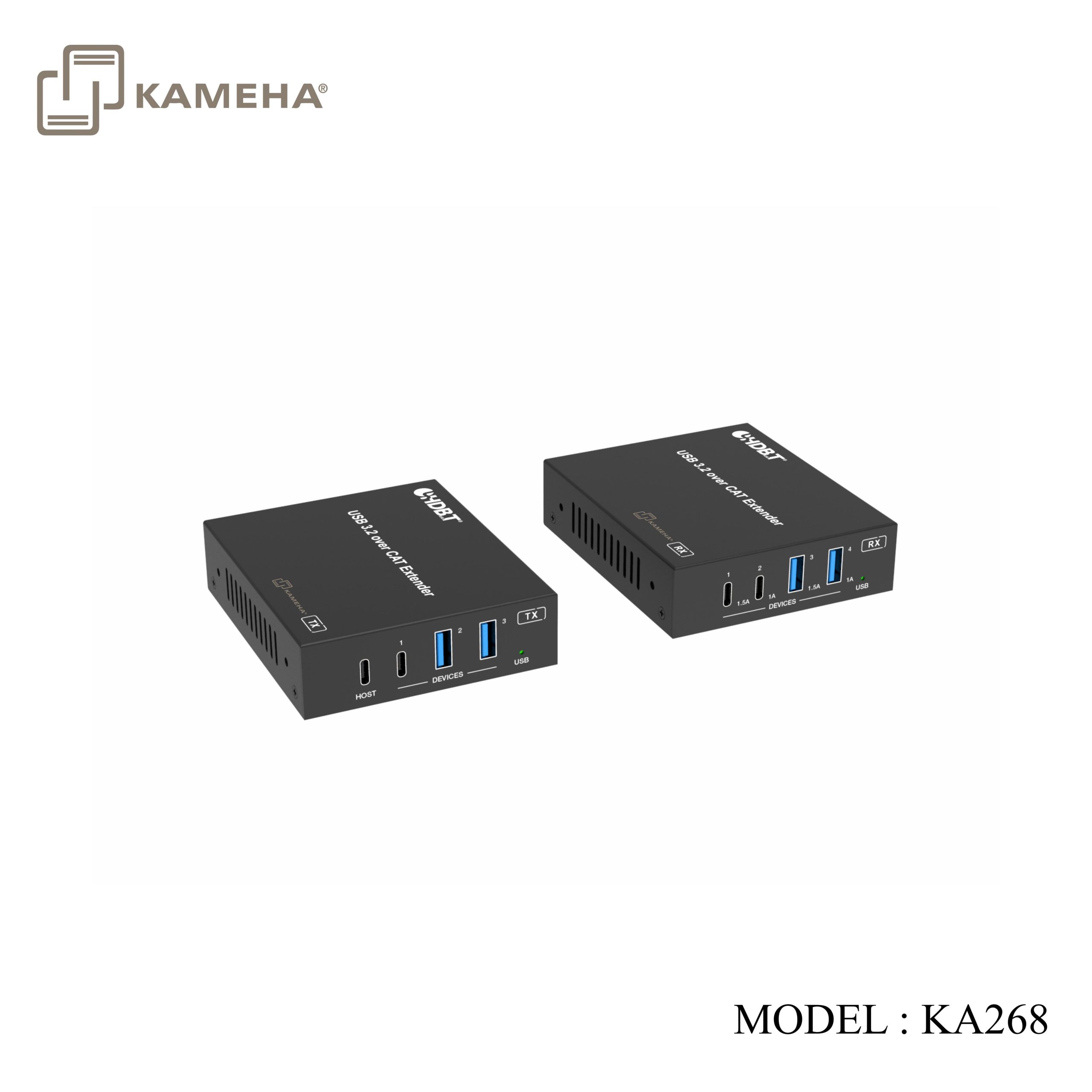
This USB Extender can extend USB 3.2 Gen 1 signal to a distance up to 100m/328ft via a single CAT6a cable. The transmitter features one USB-C host port, one USB-C and two USB-A device ports. The receiver features two USB-C and two USB-A device ports. Bi-directional 24V PoC (Power over Cable) function allows user to only supply power to either the transmitter or the receiver.
It can be widely used for long distance USB signal transmission between USB sources and devices like webcams, PTZ cameras, keyboards, mouse devices, USB microphones, flash sticks, printers, scanners, touch panel displays and other USB devices.
Features
• Extension of USB 3.2 Gen 1 up to 100m/328ft via CAT6a cable
• USB 3.2 Gen 1 connectivity with data transfer rate up to 5Gbps
• Backwards compatible with USB 2.0 and 1.1
• Hardware acceleration for isochronous and bulk transfer
• TX features 1x USB-C host port, 1x USB-C and 2x USB-A device ports
• RX features 2x USB-C (1x 5V@1A and 1x [email protected]) and 2x USB-A device ports (1x 5V@1A and 1x [email protected])
• Support firmware upgrade via USB-C service port
• Support FSYNC GPIO pass-through for industry camera use
• Support bi-directional 24V PoC (Power over Cable), when TX or RX gets power, the other end does not need an external power supply
• Plug-and-play with no drivers, downloads, or software required
Specifications
| Technical | |
| USB Protocol | USB 3.2 Gen 1 |
| Transmission Rate | Up to 5Gbps |
| Transmission Distance | 100m/328ft via CAT6a (F/FTP) cable
1.5m/4.9ft via USB cable |
| ESD Protection | IEC 61000-4-2: ±8kV (Air-gap discharge), ±4kV (Contact discharge) |
| Connections | |
| Transmitter | Input: 1× HOST [USB Type C, 24-pin female]
Output: 1× USB-C DEVICE [USB Type C, 24-pin female] 2× USB-A DEVICE [USB Type A, 9-pin female] 1× HDBT-USB3 [RJ45 connector, 24V PoC] Control: 1× RS-232 [3pin-3.5mm phoenix connector] 1× FSYNC [1pin-3.5mm phoenix connector] 1× SERVICE [USB Type C, firmware update port] |
| Receiver | Input: 1× HDBT-USB3 [RJ45 connector, 24V PoC]
Output: 2× USB-A DEVICE [USB Type A, 9-pin female] 2× USB-C DEVICE [USB Type C, 24-pin female] Control: 1× RS-232 [3pin-3.5mm phoenix connector] 1× FSYNC [1pin-3.5mm phoenix connector] 1× SERVICE [USB Type C, firmware update port] |
| Mechanical | |
| Housing | Metal Enclosure |
| Color | Black |
| Dimensions | TX / RX: 100mm [W] × 85mm [D] × 25.5mm [H] |
| Weight | TX: 265g; RX: 275g |
| Power Supply | Input: AC 100~240V 50/60Hz
Output: DC 24V/3.75A |
| Power Consumption | TX: 23W (Max); RX: 35W (Max);
TX+RX: 68W (Max, including line loss) |
| Operating Temperature | 0°C ~ 40°C / 32°F ~ 104°F |
| Storage Temperature | -20°C ~ 60°C / -4°F ~ 140°F |
| Operating Humidity | 20%~80% relative humidity, non-condensing |
| Storage Humidity | 10%~90% relative humidity, non-condensing |
Operation Controls and Functions
Transmitter Panel
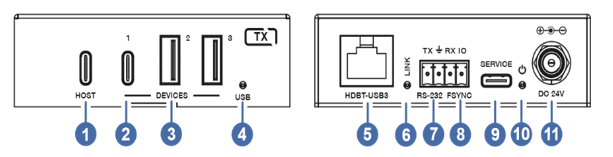
| No. | Name | Function Description |
| 1 | HOST | Uplink USB-C port, connected to PC or host. It can be used for HUB firmware update. |
| 2 | USB DEVICES
(1) |
Downlink USB-C port, connected to USB devices such as U disk or hard disk. Its output power is up to 5V/1A. |
| 3 | USB DEVICES
(2~3) |
Downlink USB-A port, connected to USB devices such as U disk or hard disk. Its output power is up to 5V/1A. |
| 4 | USB LED | USB signal indicator.
▪ On: USB 3.0 signal is detected. ▪ Blinking: USB 2.0 signal is detected. ▪ Off: USB signal is not detected. |
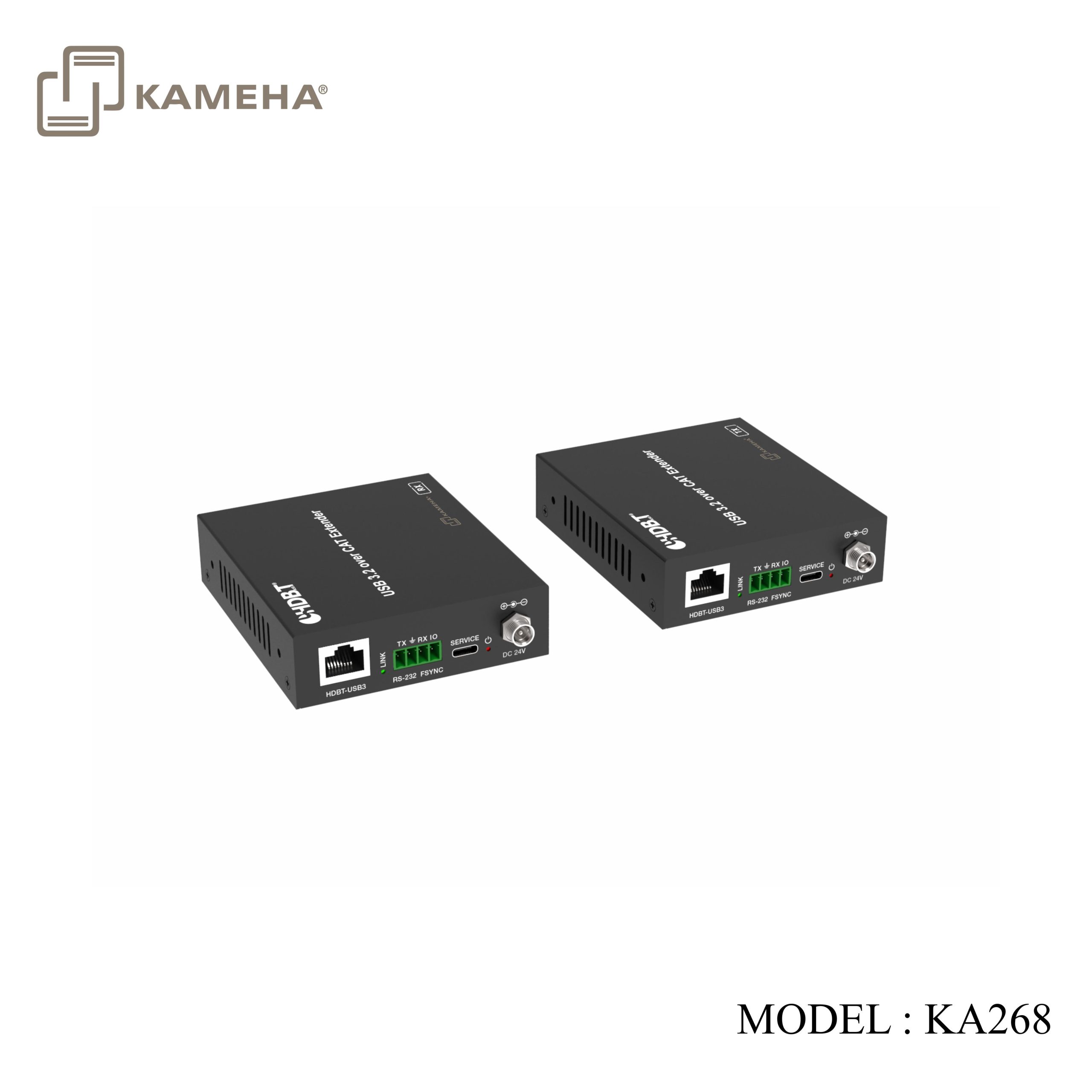
| 5 | HDBT-USB3 | Connects to the HDBT-USB3 port on Receiver with CAT6a cable. It can also be used for 24V PoC power supply. |
| 6 | LINK LED | Connection signal indicator.
▪ On: Transmitter and Receiver are connected and linked. ▪ Off: Transmitter and Receiver are not connected. |
| 7 | RS-232 | 3pin phoenix connector, connected to a PC or control system for RS-232 command pass-through. |
| 8 | FSYNC | FSYNC port, the level pass through from Transmitter to Receiver, to synchronize the external devices. Default level range is 0~5V. |
| 9 | SERVICE | USB-C port for firmware update, supporting USB 2.0. |
| 10 | Power LED | The LED will be on when the transmitter is powered on. |
| 11 | DC 24V | DC 24V/3.75A power input port. |
Receiver Panel
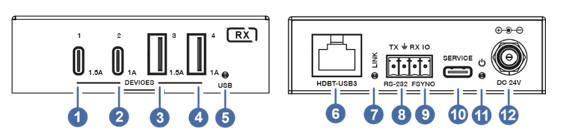
| No. | Name | Function Description |
| 1 | USB DEVICES 1 | Downlink USB-C port, connected to USB devices such as U disk or hard disk. Its output power is up to 5V/1.5A. |
| 2 | USB DEVICES 2 | Downlink USB-C port, connected to USB devices such as U disk or hard disk. Its output power is up to 5V/1A. |
| 3 | USB DEVICES 3 | Downlink USB-A port, connected to USB devices such as U disk or hard disk. Its output power is up to 5V/1.5A. |
| 4 | USB DEVICES 4 | Downlink USB-A port, connected to USB devices such as U disk or hard disk. Its output power is up to 5V/1A. |
| 5 |
USB LED |
USB signal indicator.
▪ On: USB 3.0 signal is detected. ▪ Blinking: USB 2.0 signal is detected. ▪ Off: USB signal is not detected. |
| 6 | HDBT-USB3 | Connects to the HDBT-USB3 port on Transmitter with CAT6a cable. It can also be used for 24V PoC power supply. |
| 7 | LINK LED | Connection signal indicator.
▪ On: Transmitter and Receiver are connected and linked. ▪ Off: Transmitter and Receiver are not connected. |
| 8 | RS-232 | 3pin phoenix connector, connected to a PC or control system for RS-232 command pass-through. |
| 9 | FSYNC | FSYNC port, the level pass through from Transmitter to Receiver, to synchronize the external devices. Default level range is 0~5V. |
| 10 | SERVICE | USB-C port for firmware update, supporting USB 2.0. |
| 11 | Power LED | The LED will be on when the receiver is powered on. |
| 12 | DC 24V | DC 24V/3.75A power input port. |
Application Example
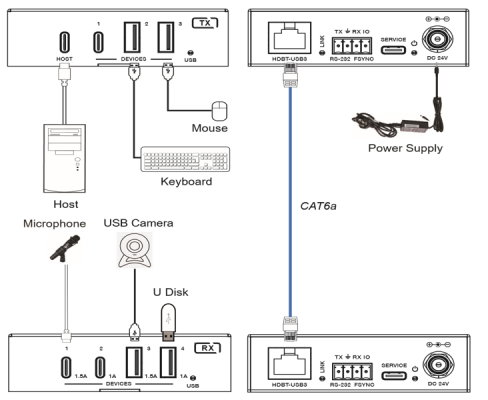
Additional information
| Weight | 1.40 kg |
|---|---|
| Dimensions | 23.60 × 15.00 × 8.00 cm |
| Warranty | 1 YEAR WARRANTY |
| WHAT'S IN THE BOX | 1* USB 3.2 Gen 1 Extender (Transmitter) |
Related products





Converter


