

Description
Introduction
This H.264/265 Video over IP Controller is used to control and manage IP products. It supports dual 1G network ports, which can realize dual network isolation of Control network and video distribution network. The product supports Web GUI/TCP/RS-232/IR/GPIO controls and POE function. Since the demand of IP products is daily increased in the current market, the IP Controller will be widely applied in more and more different scenarios.
Features
• Easy to create, control and manage the system
• HTTPS, SSH security compatible
• Support video AES256 security encryption
• Built-in Web GUI control interface, supporting Drag & Drop operations
• Support image preview
• Support video, audio, RS-232, KVM control and management of the distributed system
• Dual 1G network ports (VIDEO LAN port supports POE function) to isolate Controls and video networks
• Support IP camera imported as source
• Dual RS-232 ports, capable of connecting to central control or controlling external devices
• Support IR signal receiving and loop output (3.5mm audio jack, 12V level)
• 4 channel GPIO control ports (5V/12V optional level)
• Multiple circuits protection, lightning protection and ESD design
• Reliable system design, ensuring 7*24 hours reliable and stable work
Specifications
| Technical | |
| Network Bandwidth | 1G |
| Transmission | 100m (CAT5E/6/6A/7) |
| Distance | 1x 1G LAN [RJ45 connector] [VIDEO LAN supports POE]
1x IR IN [3.5mm audio jack, 12V level] 1x IR OUT [3.5mm audio jack, 5V level] 1x DIGITAL I/O [6-pin 3.81mm phoenix connector] 1x RS-232 [3-pin 3.81mm phoenix connector] 1xUPDATE [Micro USB, 5-pin female] |
| Control Ports | 204mm (W) × 117.5mm (D) × 21.5mm (H) |
| 1 x IR IN [3.5mm audio jack, 12V level] | Metal Enclosure |
| 1 x IR OUT [3.5mm audio jack, 5V level] | Black |
| x DIGITAL I/O [6-pin 3.81mm phoenix connector] | 597g |
| x RS-232 [3-pin 3.81mm phoenix connector] | 12V/2.5A |
| 1 x UPDATE [Micro USB, 5-pin female] | 6.84W |
| Dimensions | 0°C ~ 40°C / 32°F ~ 104°F |
| Housing | -20°C ~ 60°C / -4°F ~ 140°F |
| Color | 20~90% RH (non-condensing) |
Operation Controls and Functions
Front Panel

| No. | Name | Function Description |
| 1 | UPDATE | Firmware update port.
Note: Must keep no connection on this port when Controller works in normal mode. |
| 2 | RESET Button | Press and hold this button (about 10 seconds) until STATUS LED starts flashing, Controller will be reset automatically. |
| 3 | POWER LED | The red LED will light on when the Controller is powered on. |
| 4 | STATUS LED | The status LED will flash in yellowish-green every 1 second until Controller boots up completely and Control LAN is ready, then it becomes solid. |
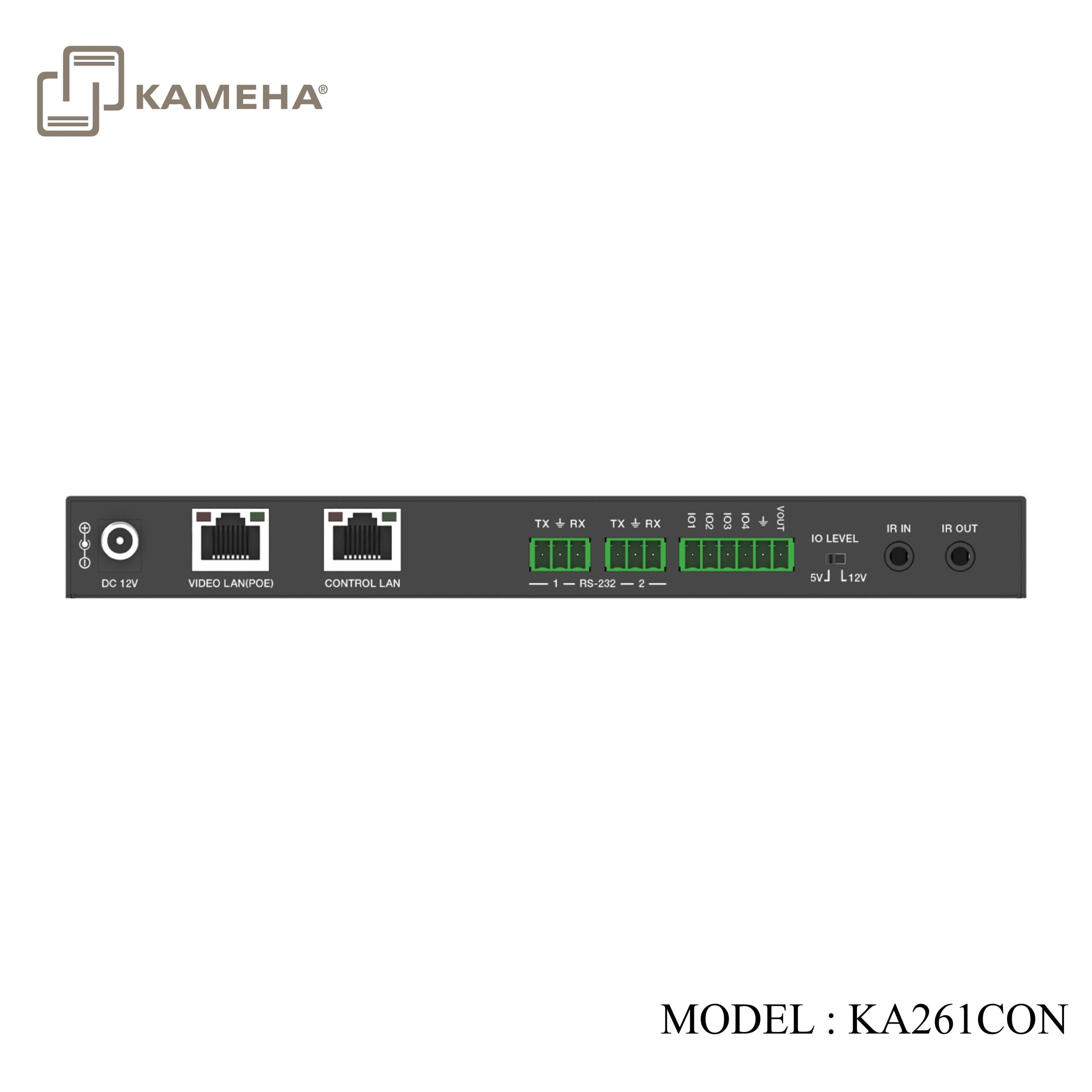
Rear Panel

| No. | Name | Function Description |
| 1 | DC 12V | DC 12V/2.5A power input port. |
| 2 | VIDEO LAN (POE) | 1G Video LAN port, supporting POE function.
Note: When POE is enabled, DC 12V/2.5A power supply is not required. |
| 3 | CONTROL LAN | The TCP/IP control network port. |
| 4 | 3-pin Phoenix Connectors | Two identical RS-232 serial communication ports. |
| 5 | 6-pin Phoenix Connector | 4 channel I/O level outputs, 1 channel grounding, 1 channel power supply (supports up to 12V/0.5A) to the outside. |
| 6 | IO LEVEL DIP Switch | Used to control I/O level output and VOUT voltage.
Switch to left: 5V I/O level output, VOUT is 5V. Switch to right: 12V I/O level output, VOUT is 12V. |
| 7 | IR IN | 12V IR signal input port. |
| 8 | IR OUT | 5V IR signal output port. |
Application Example

Click here for product PDF file
Click here for product manual
Click here for product tutorial (software control)
Additional information
| Weight | 1.00 kg |
|---|---|
| Dimensions | 25.70 × 15.90 × 7.70 cm |
| Warranty | 1 YEAR WARRANTY |
| WHAT'S IN THE BOX? | 1* H.264/265 Video over IP Controller |
Related products